Building Autonomous AI Workflows with LLMs

Large Language Models (LLMs) have transformed how we interact with technology, moving rapidly from simple conversational chatbots to reasoning engines capable of driving complex, multi-step actions. While a single prompt-response interaction can be powerful, the real value of generative AI in enterprise settings lies in Autonomous AI Workflows.
Rather than relying on human operators to orchestrate every step, autonomous workflows use LLMs as central decision-makers that plan, execute, evaluate, and self-correct tasks over long periods.
This deep dive explores how to architect, build, and deploy reliable autonomous AI workflows using modern design patterns, state machines, and robust guardrails.
1. The Agentic Shift: Chatbots vs. Workflows
The evolution of LLM applications can be categorized into four distinct levels of autonomy:
| Level | Paradigm | Human Role | Core Mechanism |
|---|---|---|---|
| Level 1 | Conversational Chat | High (Prompts every turn) | Stateless Single-Turn Completions |
| Level 2 | Tool Calling / Function Calling | Medium (Provides context) | Model chooses API to call; returns result |
| Level 3 | Directed Workflows | Low (Defines goals and graph) | Hardcoded state machine with LLM routing |
| Level 4 | Fully Autonomous Agents | Minimal (Defines objective/budget) | LLM-driven planning, execution, and reflection loops |
While Level 4 agents are highly flexible, they are notoriously difficult to predict in production environments. Therefore, most enterprise architectures are built on Level 3: Directed Workflows, combining the deterministic reliability of software state machines with the dynamic reasoning of LLMs.
2. Core Pillars of Autonomous Workflows
To build an autonomous workflow, you need to combine four foundational components:
A. Reasoning & Planning
At the heart of the workflow is the planning paradigm. A naive LLM call tries to output the final answer immediately, which often leads to reasoning failures. Autonomous workflows use specialized planning loops:
- ReAct (Reason + Act): The model iteratively thinks, acts (calls a tool), and observes the result, repeating this loop until the goal is achieved.
- Chain of Thought (CoT): Forcing the model to output its step-by-step reasoning before arriving at a conclusion.
- Tree of Thoughts (ToT): Generating and evaluating multiple alternative paths, keeping track of different branches, and backtracking when a path fails.
B. Short-Term & Long-Term Memory
An autonomous system must maintain state across multiple execution cycles:
- Short-Term Memory: The thread context, state variables, and execution logs that keep track of what the workflow is currently doing.
- Long-Term Memory: Vector databases and semantic retrieval systems that allow the workflow to recall historical runs, user preferences, and enterprise documentation.
C. Tools & Web Integration
To act on the physical or digital world, LLMs must interface with external services. The model needs access to database drivers, file systems, web browsers, and third-party APIs. Modern workflows are increasingly adopting the Model Context Protocol (MCP), standardizing how LLMs discover and safely connect to contextual data sources and execution sandboxes.
3. Key Architectural Design Patterns
When building complex agentic systems, software engineers rely on a set of proven design patterns to manage complexity and maintain predictability:
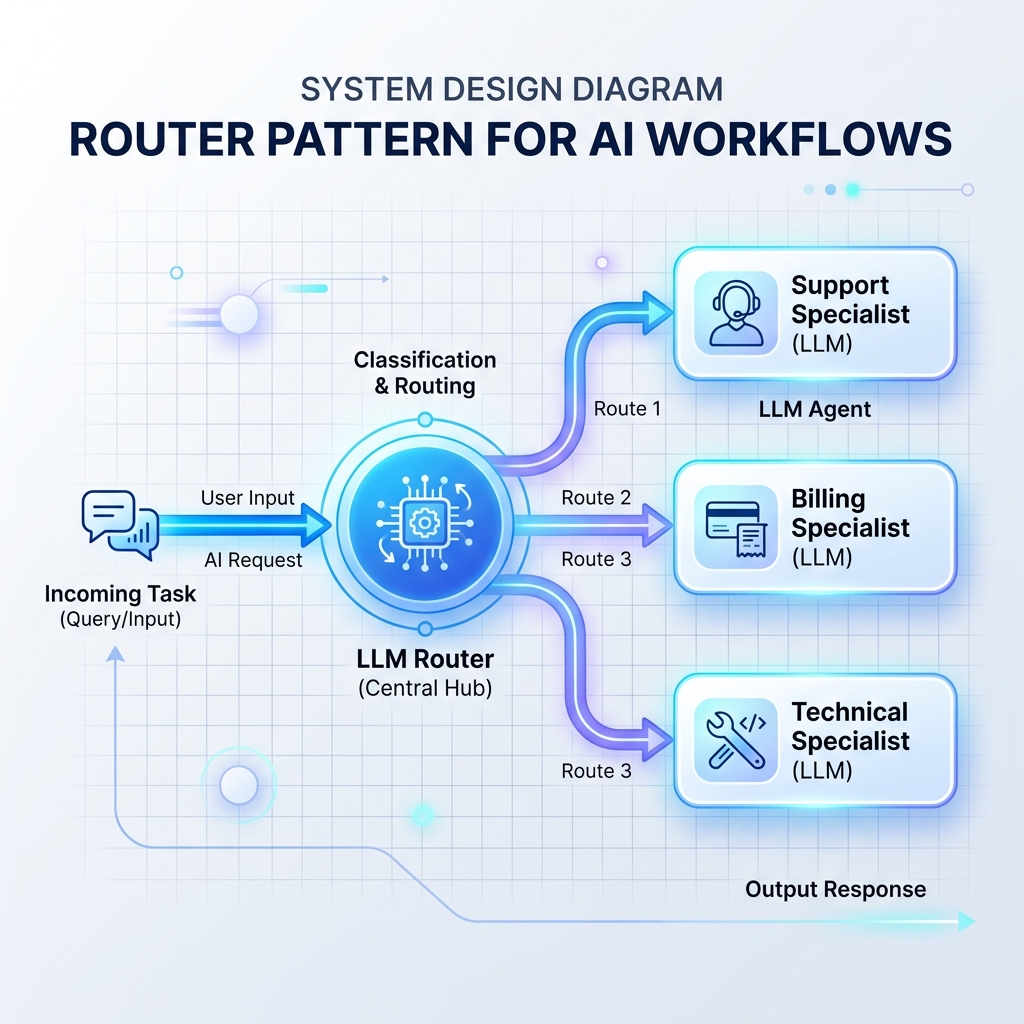
Pattern 1: The Router Pattern
A router reads incoming inputs and decides which specialized LLM prompt, database, or API handler should process it next. This prevents a single, monolithic LLM prompt from being overloaded with too many instructions.
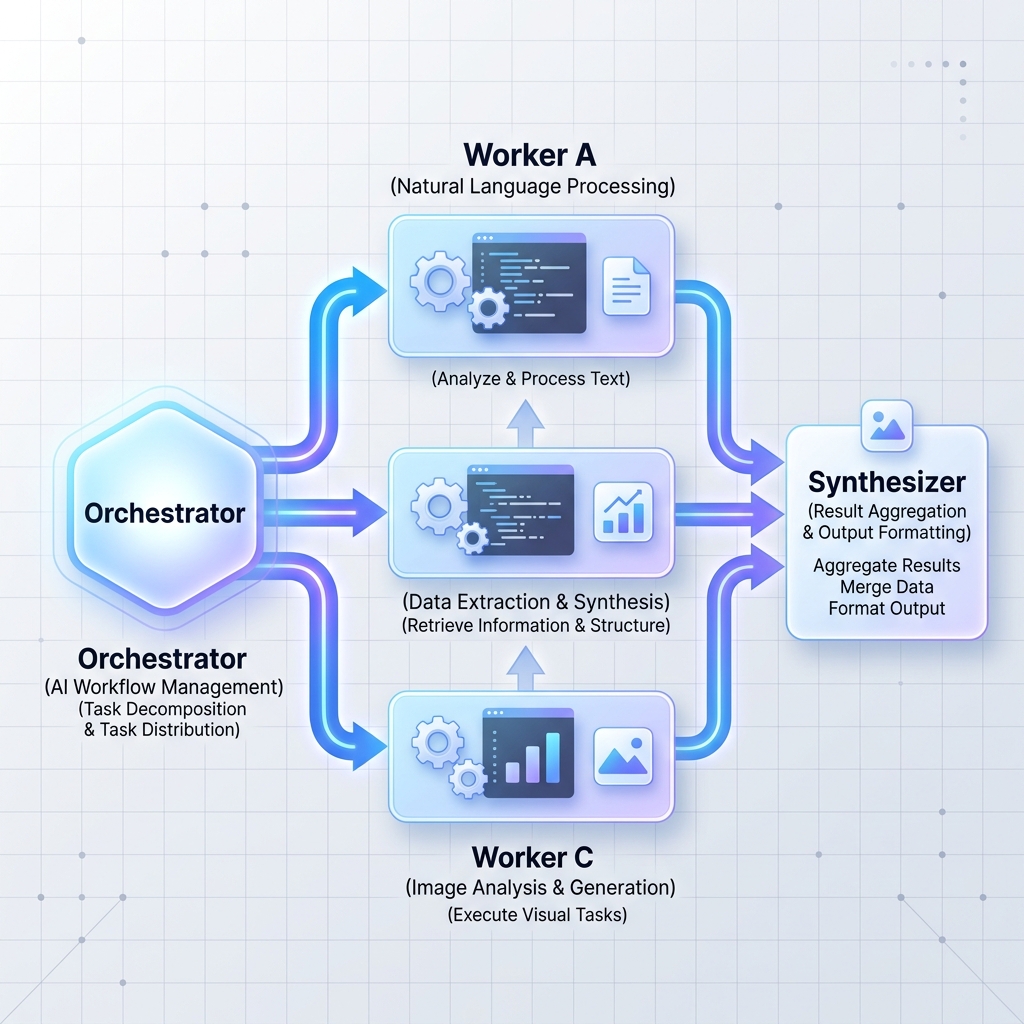
Pattern 2: Orchestrator-Workers
A central orchestrator LLM breaks a large, complex task down into independent sub-tasks. It then delegates these tasks to worker nodes (which can be specialized LLMs or standard microservices) and synthesizes the results.
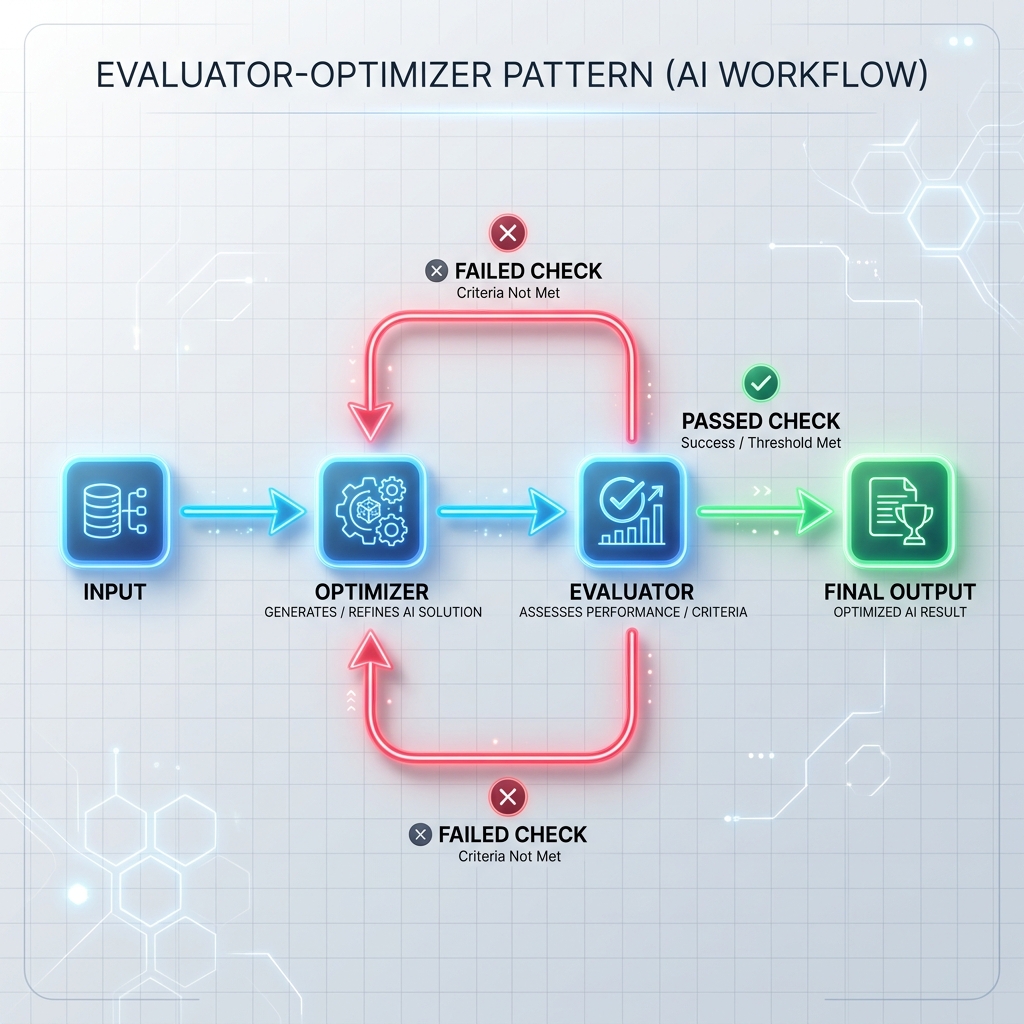
Pattern 3: Evaluator-Optimizer Loop
The optimizer generates a draft response or executes a task, and the evaluator checks it against formal criteria (like unit tests, security scanners, or a separate evaluation prompt). If the check fails, the feedback is passed back to the optimizer to regenerate the response.
4. Building a State-Based Agent in Python
Let’s look at a concrete implementation of an autonomous agent using a simple state machine. We will define an agent that processes refund requests. The agent checks the customer’s purchase history, validates the request against policies, drafts an email response, and requests human approval if the refund exceeds $100.
import json
from typing import Dict, Any

# Mock databases and tools
PURCHASE_DB = {
    "user_123": {"item": "Premium Subscription", "price": 149.00, "days_ago": 12},
    "user_456": {"item": "Basic License", "price": 49.00, "days_ago": 45}
}

class AutonomousRefundAgent:
    def __init__(self):
        self.state: Dict[str, Any] = {
            "step": "INIT",
            "user_id": None,
            "refund_amount": 0.0,
            "policy_passed": False,
            "requires_approval": False,
            "approved": False,
            "response_draft": "",
            "log": []
        }

    def run(self, user_id: str, request_text: str):
        self.state["user_id"] = user_id
        self.state["log"].append(f"Started workflow for user {user_id} with request: '{request_text}'")

        while self.state["step"] != "COMPLETE":
            current_step = self.state["step"]
            if current_step == "INIT":
                self._fetch_user_data()
            elif current_step == "VALIDATE_POLICY":
                self._validate_policy()
            elif current_step == "CHECK_APPROVAL":
                self._check_approval_requirements()
            elif current_step == "WAITING_FOR_HUMAN":
                # Pause execution and yield control back to the orchestrator
                self.state["log"].append("Execution paused: waiting for human operator approval.")
                break
            elif current_step == "EXECUTE_REFUND":
                self._execute_refund()
            elif current_step == "DRAFT_RESPONSE":
                self._draft_response()

        return self.state

    def _fetch_user_data(self):
        user_id = self.state["user_id"]
        purchase = PURCHASE_DB.get(user_id)
        if not purchase:
            self.state["response_draft"] = "No purchase history found for this user."
            self.state["step"] = "DRAFT_RESPONSE"
            self.state["log"].append("Fetch failed: User not found in database.")
            return

        self.state["refund_amount"] = purchase["price"]
        self.state["purchase_age_days"] = purchase["days_ago"]
        self.state["step"] = "VALIDATE_POLICY"
        self.state["log"].append(f"Fetched purchase data: {purchase}")

    def _validate_policy(self):
        # Business rule: Refunds only allowed within 30 days
        age = self.state["purchase_age_days"]
        if age <= 30:
            self.state["policy_passed"] = True
            self.state["step"] = "CHECK_APPROVAL"
            self.state["log"].append("Policy validation passed (within 30-day window).")
        else:
            self.state["policy_passed"] = False
            self.state["response_draft"] = "Sorry, our policy only allows refunds within 30 days of purchase."
            self.state["step"] = "DRAFT_RESPONSE"
            self.state["log"].append("Policy validation failed: Purchase older than 30 days.")

    def _check_approval_requirements(self):
        # Business rule: Refunds over $100 require human review
        amount = self.state["refund_amount"]
        if amount > 100.0:
            self.state["requires_approval"] = True
            self.state["step"] = "WAITING_FOR_HUMAN"
            self.state["log"].append(f"Refund of ${amount} exceeds limit. Moving to human approval state.")
        else:
            self.state["requires_approval"] = False
            self.state["step"] = "EXECUTE_REFUND"
            self.state["log"].append(f"Refund of ${amount} is within limits. Proceeding to execution.")

    def resume_with_human_decision(self, approved: bool):
        if self.state["step"] != "WAITING_FOR_HUMAN":
            raise ValueError("Agent is not currently waiting for approval.")

        self.state["approved"] = approved
        self.state["log"].append(f"Human manager decision received: Approved = {approved}")

        if approved:
            self.state["step"] = "EXECUTE_REFUND"
        else:
            self.state["response_draft"] = "Your refund request has been reviewed and declined by a customer service manager."
            self.state["step"] = "DRAFT_RESPONSE"

        # Resume the workflow loop
        return self.run(self.state["user_id"], "")

    def _execute_refund(self):
        amount = self.state["refund_amount"]
        # Trigger actual external API call/Stripe integration here
        self.state["log"].append(f"Successfully processed stripe refund for ${amount}.")
        self.state["response_draft"] = f"Your refund request for ${amount} has been successfully processed."
        self.state["step"] = "DRAFT_RESPONSE"

    def _draft_response(self):
        # Prompt LLM to draft a polite, personalized message incorporating response_draft
        self.state["final_message"] = f"Dear Customer,\n\n{self.state['response_draft']}\n\nBest regards,\nGhaznix Support Agent"
        self.state["step"] = "COMPLETE"
        self.state["log"].append("Customer email drafted successfully. Workflow complete.")
5. Production Reliability and Security Guardrails
Deploying autonomous systems requires a shift in how we think about testing and error handling. Here are critical guardrails you must build into any production system:
A. Preventing Runaway Execution Loops
An autonomous agent that encounters an error or an edge case might query the same tool repeatedly, spending thousands of dollars in API costs in a matter of minutes.
- Solution: Implement maximum execution limits. Always define a hard ceiling on the number of steps or total model tokens allowed per workflow instance (e.g., maximum 10 iterations).
B. Structural Schema Validation
LLMs are probabilistic and do not naturally guarantee structured outputs like valid JSON or matching schemas.
- Solution: Use validation libraries like Pydantic, Instructor, or Outlines to enforce structure at the inference level. If a model outputs invalid schemas, reject it early and prompt the model with the parse error to fix itself (part of the Evaluator-Optimizer loop).
C. Sandbox Execution of Code
If your agent writes and runs code (like data analysis or database transformations), running it directly on your application server is a major security vulnerability.
- Solution: Use secure, ephemeral micro-VM environments (like Docker containers, gVisor, or WASM runtimes) to run user-generated or agent-generated scripts safely.
Conclusion
Building autonomous AI workflows with LLMs requires bridging the gap between flexible AI reasoning and structured engineering discipline. By replacing open-ended agents with state-machine directed workflows, structuring tasks via patterns like Orchestrator-Workers, and wrapping everything in strict execution and security guardrails, developers can build systems that are both highly intelligent and enterprise-ready.
The future of software architecture isn’t about replacing code with prompts—it’s about orchestrating agents and deterministic systems to build workflows that operate autonomously, learn dynamically, and deliver results reliably.
Empower Your Digital Presence & Workflows
Explore top-tier tools built by Ghaznix to streamline your links, surveys, and brand growth.