通过真实示例解释 Electron IPC 通信
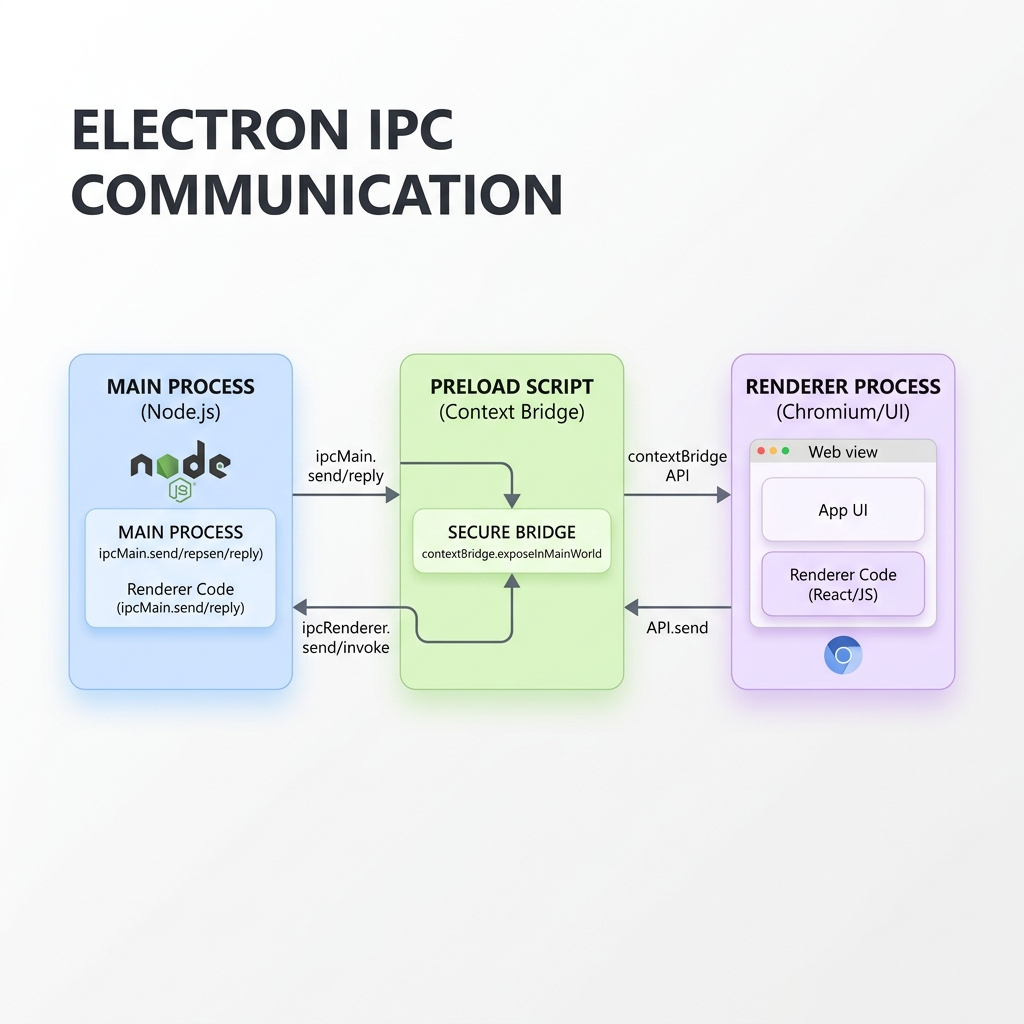
Electron 是使用 HTML、CSS 和 JavaScript 等 Web 技术构建跨平台桌面应用程序最流行的框架之一。在底层,Electron 采用多进程架构,由一个主进程(运行 Node.js)和一个或多个渲染进程(运行 Chromium 来渲染用户界面)组成。
由于安全风险,现代 Electron 应用程序会将渲染进程与操作系统隔离。这意味着您无法直接从渲染器 UI 访问 Node.js 模块或系统资源(例如读取文件或查询数据库)。
为了安全地桥接这一差距,Electron 使用了进程间通信 (IPC)。
在本指南中,我们将解释 Electron IPC 的工作原理,并通过真实的、可用于生产的代码示例来探索三种基本的通信模式。
1. 渲染器到主进程(单向 / One-Way)
当渲染器想要向主进程发送命令或操作而不等待任何响应时,使用此模式。一个常见的示例是单击 UI 中的按钮以最小化或关闭应用程序窗口。
让我们看看这如何在三个关键文件中实现:main.js、preload.js 和 renderer.js。
主进程 (main.js)
我们使用 ipcMain.on 来监听来自渲染进程的事件。
const { app, BrowserWindow, ipcMain } = require('electron');
const path = require('path');

function createWindow() {
  const win = new BrowserWindow({
    width: 800,
    height: 600,
    webPreferences: {
      preload: path.join(__dirname, 'preload.js'),
      contextIsolation: true,
      nodeIntegration: false
    }
  });
  win.loadFile('index.html');
}

// 监听来自渲染器的 'close-app' 事件
ipcMain.on('close-app', () => {
  app.quit();
});
预加载脚本 (preload.js)
我们使用 contextBridge.exposeInMainWorld 向渲染器暴露一个安全的包装器,而不暴露整个 ipcRenderer 模块。
const { contextBridge, ipcRenderer } = require('electron');

contextBridge.exposeInMainWorld('electronAPI', {
  closeApp: () => ipcRenderer.send('close-app')
});
渲染进程 (renderer.js)
我们调用在 window 对象上暴露的函数。
const closeButton = document.getElementById('close-btn');

closeButton.addEventListener('click', () => {
  window.electronAPI.closeApp();
});
2. 渲染器到主进程(双向 / 请求-响应)
当渲染器需要向主进程请求数据或触发系统操作并等待结果时(例如,读取文件或进行安全数据库查询),使用此模式。
我们在主进程中使用 ipcMain.handle,在预加载脚本中使用 ipcRenderer.invoke。
主进程 (main.js)
使用 ipcMain.handle 监听请求并异步返回数据。
const { ipcMain } = require('electron');
const fs = require('fs/promises');

// 异步处理 'read-file' 调用
ipcMain.handle('read-file', async (event, filePath) => {
  try {
    const data = await fs.readFile(filePath, 'utf-8');
    return { success: true, content: data };
  } catch (error) {
    return { success: false, error: error.message };
  }
});
预加载脚本 (preload.js)
暴露一个返回 Promise 的异步包装器。
const { contextBridge, ipcRenderer } = require('electron');

contextBridge.exposeInMainWorld('electronAPI', {
  readFile: (filePath) => ipcRenderer.invoke('read-file', filePath)
});
渲染进程 (renderer.js)
使用 await 等待返回的 Promise 解析。
const readBtn = document.getElementById('read-btn');

readBtn.addEventListener('click', async () => {
  const result = await window.electronAPI.readFile('/path/to/file.txt');
  if (result.success) {
    console.log('文件内容:', result.content);
  } else {
    console.error('读取文件失败:', result.error);
  }
});
3. 主进程到渲染器(单向通知)
当主进程需要向渲染进程发送更新或通知(例如,下载进度条更新、应用程序菜单单击或后台服务状态更新)时,使用此模式。
我们在主进程中使用 webContents.send,在预加载脚本中使用 ipcRenderer.on。
主进程 (main.js)
获取活动窗口的 webContents 并发送消息。
// 示例:发送下载进度更新
function trackDownloadProgress(mainWindow) {
  let progress = 0;
  const interval = setInterval(() => {
    progress += 10;
    mainWindow.webContents.send('download-progress', progress);

    if (progress >= 100) {
      clearInterval(interval);
    }
  }, 1000);
}
预加载脚本 (preload.js)
暴露一个接收回调函数的订阅方法。最好返回一个清理函数以移除监听器。
const { contextBridge, ipcRenderer } = require('electron');

contextBridge.exposeInMainWorld('electronAPI', {
  onDownloadProgress: (callback) => {
    const subscription = (event, value) => callback(value);
    ipcRenderer.on('download-progress', subscription);

    // 返回清理函数以防止内存泄漏
    return () => {
      ipcRenderer.removeListener('download-progress', subscription);
    };
  }
});
渲染进程 (renderer.js)
订阅事件并更新 UI。
const progressBar = document.getElementById('progress-bar');

const unsubscribe = window.electronAPI.onDownloadProgress((progress) => {
  progressBar.style.width = `${progress}%`;
  progressBar.textContent = `${progress}%`;

  if (progress === 100) {
    console.log('下载完成!');
    unsubscribe(); // 清理监听器以防止内存泄漏
  }
});
4. 安全最佳实践
在使用 Electron IPC 时,安全应该是您的首要任务。如果 IPC 未受到保护,注入到渲染进程中的恶意代码可能会危及整个操作系统。
请遵循以下关键规则:
- 切勿直接暴露
ipcRenderer: 不要编写contextBridge.exposeInMainWorld('electron', ipcRenderer)。这样做会使渲染器拥有发送任何 IPC 消息的完整权限,从而绕过安全边界。 - 保持启用上下文隔离: 始终在
webPreferences中设置contextIsolation: true和nodeIntegration: false。 - 验证输入: 始终在主进程中执行操作前验证接收到的参数(如文件路径或数据库查询)。
- 首选
ipcMain.handle而不是ipcMain.on+webContents.send: 对于请求-响应模式,invoke/handle更干净,原生支持 Promise 解析,并避免混淆多个监听器回调。
结论
理解 IPC 通信是构建安全、高效且强大的 Electron 应用程序的关键。通过使用正确的模式并强制执行上下文隔离,您可以在桌面上充分利用 Node.js 的强大功能,同时保护您的用户安全。
Tags
Empower Your Digital Presence & Workflows
Explore top-tier tools built by Ghaznix to streamline your links, surveys, and brand growth.