Electron IPC Communication Explained with Real Examples
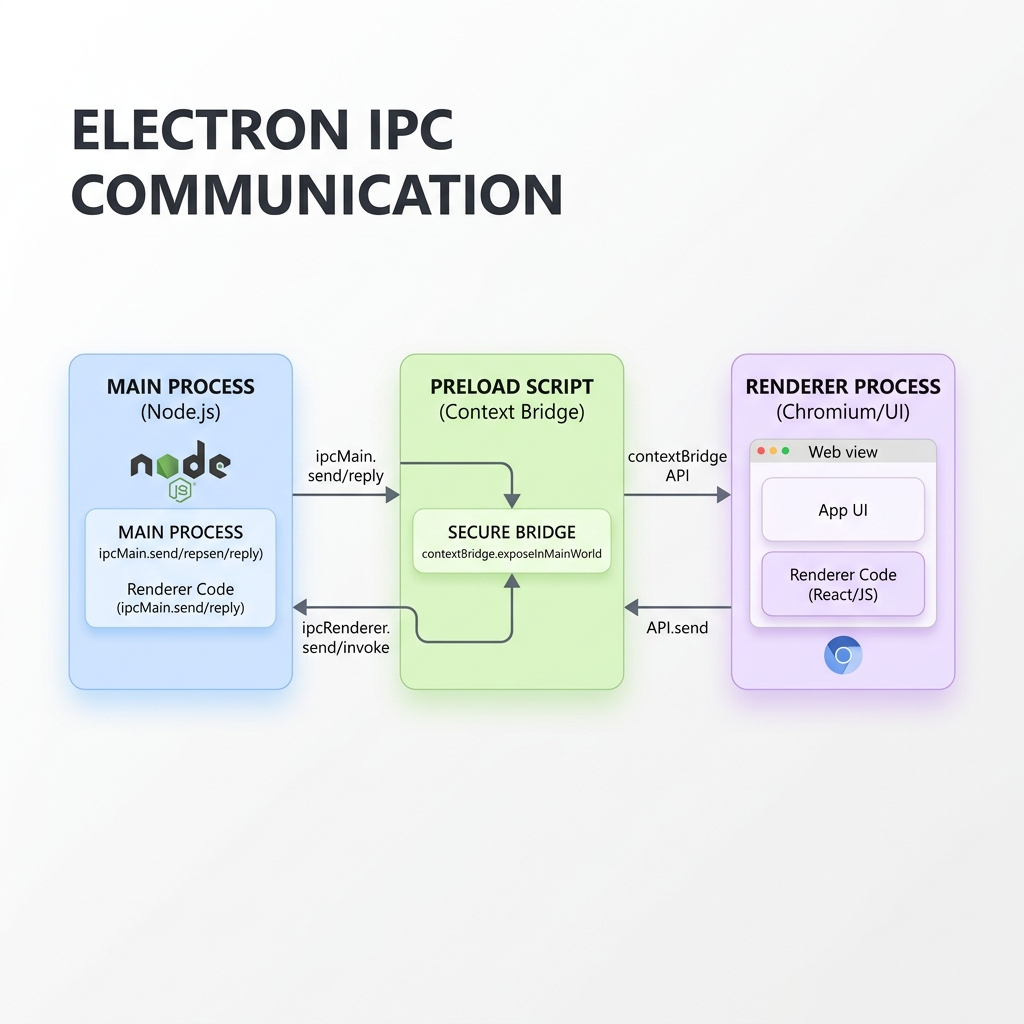
Electron is one of the most popular frameworks for building cross-platform desktop applications using web technologies like HTML, CSS, and JavaScript. Under the hood, Electron runs a multi-process architecture consisting of a Main Process (running Node.js) and one or more Renderer Processes (running Chromium to render the UI).
Because of security risks, modern Electron applications isolate the Renderer Process from the operating system. This means you cannot access Node.js modules or system resources (like reading files or querying databases) directly from the Renderer UI.
To safely bridge this gap, Electron utilizes Inter-Process Communication (IPC).
In this guide, we will explain how Electron IPC works and explore the three fundamental communication patterns with real, production-ready code examples.
1. Renderer to Main (One-Way)
This pattern is used when the Renderer wants to send a command or action to the Main process without waiting for any response. A common example is clicking a button in the UI to minimize or close the application window.
Let’s see how this is implemented across the three key files: main.js, preload.js, and renderer.js.
Main Process (main.js)
We use ipcMain.on to listen for events from the renderer process.
const { app, BrowserWindow, ipcMain } = require('electron');
const path = require('path');

function createWindow() {
  const win = new BrowserWindow({
    width: 800,
    height: 600,
    webPreferences: {
      preload: path.join(__dirname, 'preload.js'),
      contextIsolation: true,
      nodeIntegration: false
    }
  });
  win.loadFile('index.html');
}

// Listen for the 'close-app' event from the renderer
ipcMain.on('close-app', () => {
  app.quit();
});
Preload Script (preload.js)
We use contextBridge.exposeInMainWorld to expose a safe wrapper to the renderer without exposing the entire ipcRenderer module.
const { contextBridge, ipcRenderer } = require('electron');

contextBridge.exposeInMainWorld('electronAPI', {
  closeApp: () => ipcRenderer.send('close-app')
});
Renderer Process (renderer.js)
We call the function exposed on the window object.
const closeButton = document.getElementById('close-btn');

closeButton.addEventListener('click', () => {
  window.electronAPI.closeApp();
});
2. Renderer to Main (Two-Way / Request-Response)
This pattern is used when the Renderer needs to request data or trigger a system operation from the Main process and wait for the result (e.g., reading a file or making a secure database query).
We use ipcMain.handle in the Main process and ipcRenderer.invoke in the Preload script.
Main Process (main.js)
Listen for the request using ipcMain.handle and return the data asynchronously.
const { ipcMain } = require('electron');
const fs = require('fs/promises');

// Handle the 'read-file' invocation asynchronously
ipcMain.handle('read-file', async (event, filePath) => {
  try {
    const data = await fs.readFile(filePath, 'utf-8');
    return { success: true, content: data };
  } catch (error) {
    return { success: false, error: error.message };
  }
});
Preload Script (preload.js)
Expose an asynchronous wrapper that returns a Promise.
const { contextBridge, ipcRenderer } = require('electron');

contextBridge.exposeInMainWorld('electronAPI', {
  readFile: (filePath) => ipcRenderer.invoke('read-file', filePath)
});
Renderer Process (renderer.js)
Use await to wait for the returned Promise to resolve.
const readBtn = document.getElementById('read-btn');

readBtn.addEventListener('click', async () => {
  const result = await window.electronAPI.readFile('/path/to/file.txt');
  if (result.success) {
    console.log('File Content:', result.content);
  } else {
    console.error('Failed to read file:', result.error);
  }
});
3. Main to Renderer (One-Way Notification)
This pattern is used when the Main process needs to send updates or notifications to the Renderer process (e.g., download progress bar updates, application menus clicks, or background service status updates).
We use webContents.send in the Main process and ipcRenderer.on in the Preload script.
Main Process (main.js)
Get the active window’s webContents and send the message.
// Example: Sending download progress updates
function trackDownloadProgress(mainWindow) {
  let progress = 0;
  const interval = setInterval(() => {
    progress += 10;
    mainWindow.webContents.send('download-progress', progress);

    if (progress >= 100) {
      clearInterval(interval);
    }
  }, 1000);
}
Preload Script (preload.js)
Expose a subscription method that takes a callback function. It’s a good practice to return a cleanup function to remove the listener.
const { contextBridge, ipcRenderer } = require('electron');

contextBridge.exposeInMainWorld('electronAPI', {
  onDownloadProgress: (callback) => {
    const subscription = (event, value) => callback(value);
    ipcRenderer.on('download-progress', subscription);

    // Return cleanup function to prevent memory leaks
    return () => {
      ipcRenderer.removeListener('download-progress', subscription);
    };
  }
});
Renderer Process (renderer.js)
Subscribe to the events and update the UI.
const progressBar = document.getElementById('progress-bar');

const unsubscribe = window.electronAPI.onDownloadProgress((progress) => {
  progressBar.style.width = `${progress}%`;
  progressBar.textContent = `${progress}%`;

  if (progress === 100) {
    console.log('Download complete!');
    unsubscribe(); // Clean up listener to prevent memory leaks
  }
});
4. Security Best Practices
When working with Electron IPC, safety should be your top priority. Malicious code injected into the Renderer process can compromise the entire operating system if IPC is not secured.
Follow these crucial rules:
- Never Expose
ipcRendererDirectly: Do not writecontextBridge.exposeInMainWorld('electron', ipcRenderer). Doing so gives the renderer full access to send any IPC message, bypassing security boundaries. - Keep Context Isolation Enabled: Always set
contextIsolation: trueandnodeIntegration: falseinwebPreferences. - Validate Inputs: Always validate arguments received in the Main process (like file paths or database queries) before executing them.
- Prefer
ipcMain.handleoveripcMain.on+webContents.send: For request-response patterns,invoke/handleis cleaner, resolves Promises natively, and avoids mixing up multiple listener callbacks.
Conclusion
Understanding IPC communication is the key to building secure, performant, and robust Electron applications. By using the right pattern for the job and enforcing Context Isolation, you can harness the full power of Node.js on the desktop while keeping your users safe.
Empower Your Digital Presence & Workflows
Explore top-tier tools built by Ghaznix to streamline your links, surveys, and brand growth.