Costruire API REST con Java Quarkus: Guida ad alte prestazioni, reattiva e nativa per il cloud
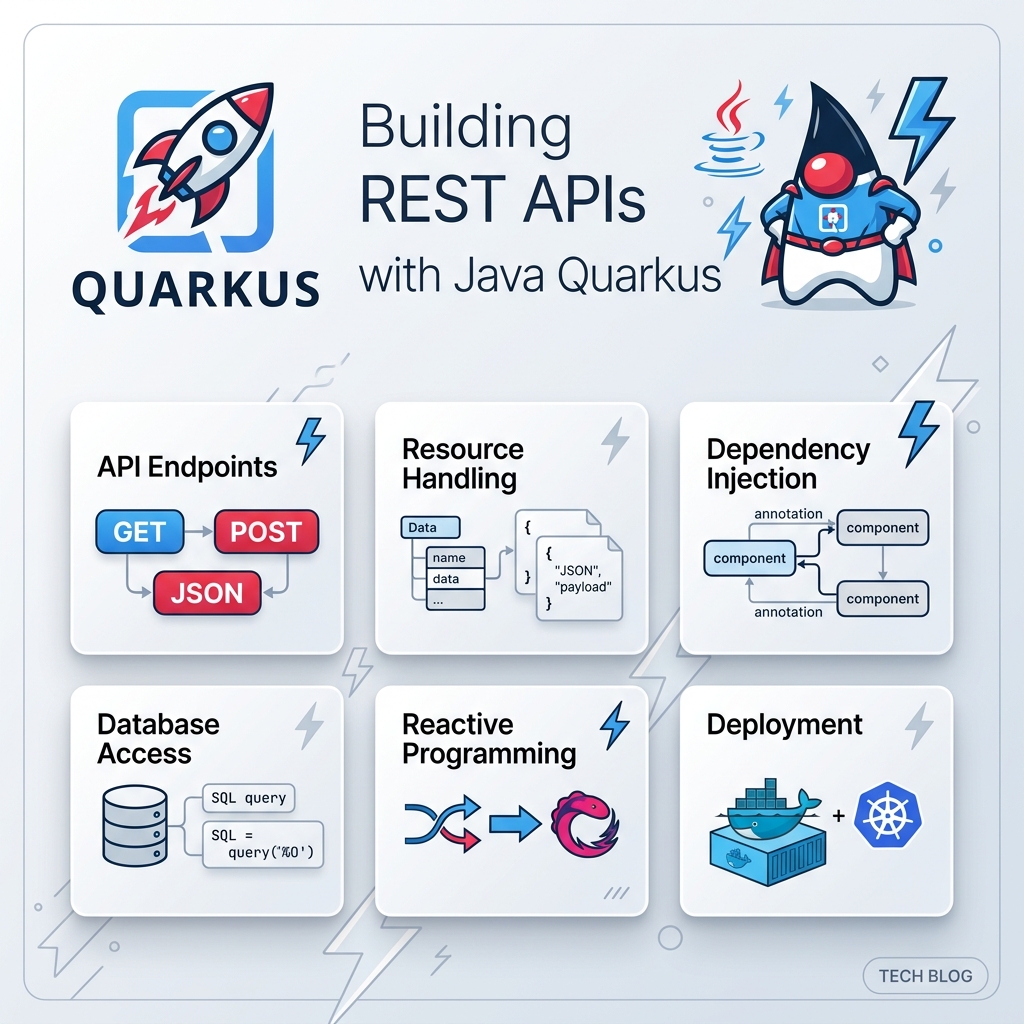
Nell’ingegneria del software aziendale moderna, la costruzione di API RESTful è la pietra angolare dello sviluppo dei sistemi backend. Per decenni, gli sviluppatori Java si sono affidati a framework tradizionali come Spring Boot o Jakarta EE. Tuttavia, con l’evoluzione del cloud computing verso ambienti containerizzati (Docker, Kubernetes) e Serverless (AWS Lambda, Knative), i backend Java tradizionali hanno rivelato due grandi colli di bottiglia: tempi di avvio lenti (cold start) ed elevata impronta di memoria (RSS).
Ecco Quarkus—il framework Supersonic Subatomic Java progettato su misura per OpenJDK HotSpot e GraalVM. Progettato da zero per Kubernetes, Quarkus trasforma radicalmente il modo in cui le applicazioni Java elaborano i metadati e gestiscono le dipendenze.
1. Perché scegliere Quarkus per le API REST Java?
Prima di scrivere il codice, è importante capire perché gli sviluppatori stanno adottando rapidamente Quarkus per lo sviluppo di servizi RESTful.
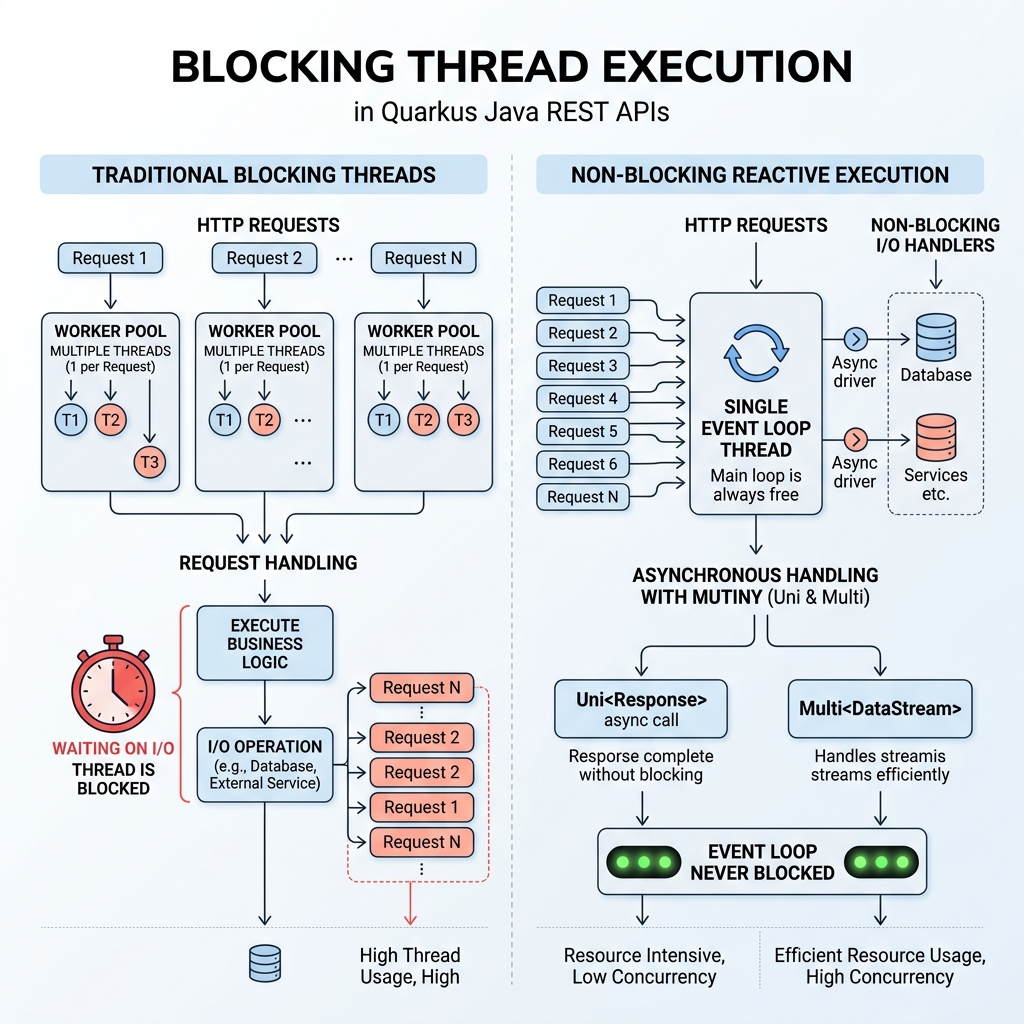
A. Il paradigma reattivo RESTEasy
I framework REST tradizionali utilizzano un modello thread-per-richiesta su API Servlet sincrone.
B. Dev Services & Live Coding senza configurazione
- Live Coding (
quarkus dev): Le modifiche vengono ricaricate in millisecondi. - Dev Services: Avvia automaticamente i container Docker per i database.
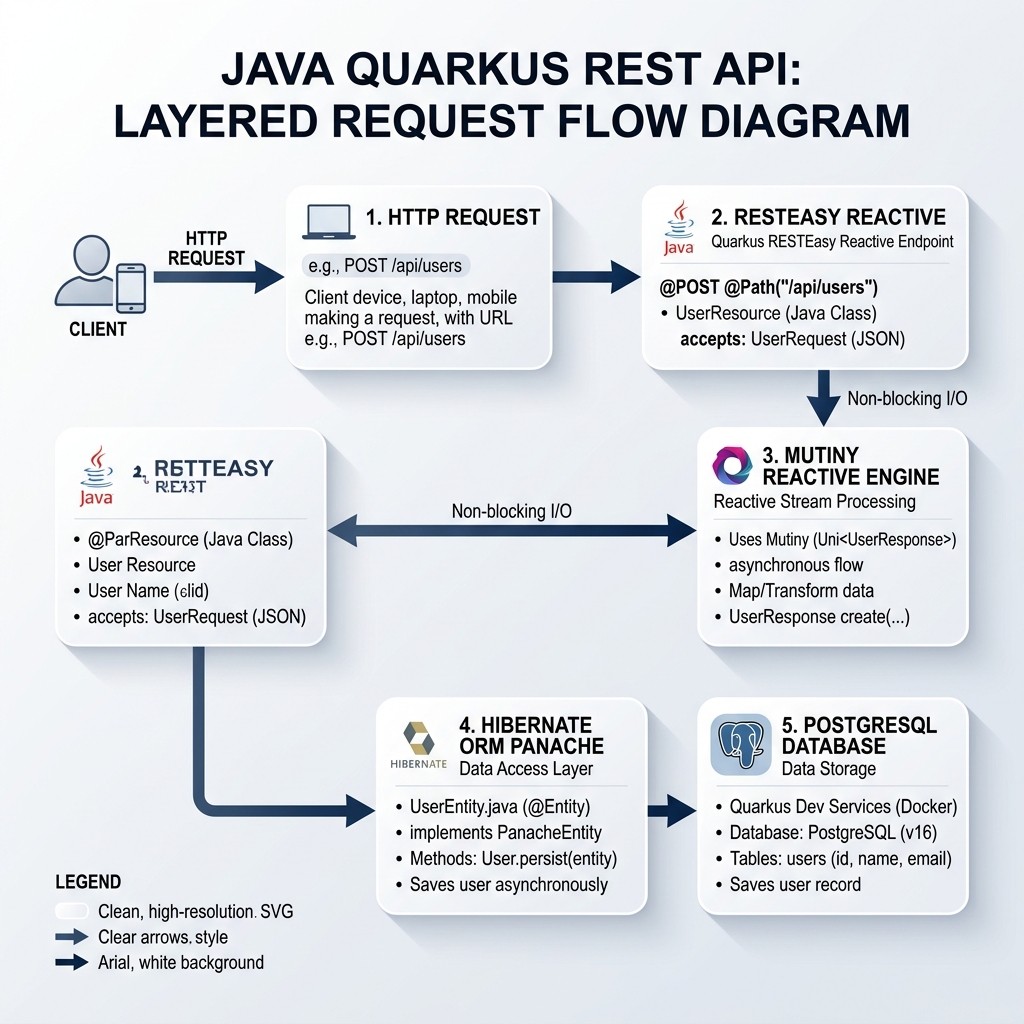
2. Architettura delle API REST Quarkus
Un’API REST Quarkus moderna segue un’architettura snella a strati.
3. Inizializzazione del progetto e dipendenze
mvn io.quarkus.platform:quarkus-maven-plugin:3.15.0:create \
    -DprojectGroupId=com.ghaznix.api \
    -DprojectArtifactId=quarkus-product-api \
    -DclassName="com.ghaznix.api.ProductResource" \
    -Dpath="/api/products" \
    -Dextensions="resteasy-reactive-jackson,hibernate-orm-panache,jdbc-postgresql,hibernate-validator,smallrye-openapi"
4. Configurazione delle proprietà dell’applicazione
# Application Configuration
quarkus.application.name=quarkus-product-api
quarkus.http.port=8080

# Database Configuration (Dev Services will override in dev mode automatically)
quarkus.datasource.db-kind=postgresql
quarkus.datasource.username=postgres
quarkus.datasource.password=secret
quarkus.datasource.jdbc.url=jdbc:postgresql://localhost:5432/product_db

# Hibernate ORM Configuration
quarkus.hibernate-orm.database.generation=drop-and-create
quarkus.hibernate-orm.log.sql=true

# Swagger UI & OpenAPI Path
quarkus.swagger-ui.always-include=true
quarkus.swagger-ui.path=/swagger-ui
5. Modello di dominio e Active Record con Panache
package com.ghaznix.api;

import io.quarkus.hibernate.orm.panache.PanacheEntity;
import jakarta.persistence.Column;
import jakarta.persistence.Entity;
import jakarta.persistence.Table;
import jakarta.validation.constraints.Min;
import jakarta.validation.constraints.NotBlank;
import jakarta.validation.constraints.NotNull;
import java.math.BigDecimal;
import java.util.List;

@Entity
@Table(name = "products")
public class Product extends PanacheEntity {

    @NotBlank(message = "Product name cannot be blank")
    @Column(nullable = false)
    public String name;

    @Column(length = 1000)
    public String description;

    @NotNull(message = "Price is required")
    @Min(value = 0, message = "Price must be non-negative")
    @Column(nullable = false)
    public BigDecimal price;

    @Column(nullable = false)
    public Integer stockQuantity;

    public String category;

    // Static Finder Utility Methods powered by Panache
    public static List<Product> findByCategory(String category) {
        return list("category", category);
    }

    public static List<Product> findAvailableProducts() {
        return list("stockQuantity > 0");
    }
}
6. Creazione di endpoint REST pronti per la produzione
package com.ghaznix.api;

import io.quarkus.panache.common.Page;
import io.quarkus.panache.common.Sort;
import jakarta.transaction.Transactional;
import jakarta.validation.Valid;
import jakarta.ws.rs.*;
import jakarta.ws.rs.core.MediaType;
import jakarta.ws.rs.core.Response;
import org.eclipse.microprofile.openapi.annotations.Operation;
import org.eclipse.microprofile.openapi.annotations.responses.APIResponse;
import org.eclipse.microprofile.openapi.annotations.tags.Tag;

import java.net.URI;
import java.util.List;

@Path("/api/products")
@Produces(MediaType.APPLICATION_JSON)
@Consumes(MediaType.APPLICATION_JSON)
@Tag(name = "Product REST API", description = "Operations for managing catalog products")
public class ProductResource {

    @GET
    @Operation(summary = "Get all products with pagination")
    @APIResponse(responseCode = "200", description = "List of products retrieved successfully")
    public List<Product> getAllProducts(
            @QueryParam("page") @DefaultValue("0") int pageIndex,
            @QueryParam("size") @DefaultValue("10") int pageSize,
            @QueryParam("sort") @DefaultValue("name") String sortBy) {

        return Product.findAll(Sort.by(sortBy))
                      .page(Page.of(pageIndex, pageSize))
                      .list();
    }

    @GET
    @Path("/{id}")
    @Operation(summary = "Get product by ID")
    @APIResponse(responseCode = "200", description = "Product details found")
    @APIResponse(responseCode = "404", description = "Product not found")
    public Product getProductById(@PathParam("id") Long id) {
        Product product = Product.findById(id);
        if (product == null) {
            throw new NotFoundException("Product with ID " + id + " does not exist.");
        }
        return product;
    }

    @POST
    @Transactional
    @Operation(summary = "Create a new product")
    @APIResponse(responseCode = "201", description = "Product created successfully")
    @APIResponse(responseCode = "400", description = "Invalid request payload")
    public Response createProduct(@Valid Product product) {
        product.persist();
        return Response.created(URI.create("/api/products/" + product.id))
                       .entity(product)
                       .build();
    }

    @PUT
    @Path("/{id}")
    @Transactional
    @Operation(summary = "Update an existing product")
    @APIResponse(responseCode = "200", description = "Product updated")
    @APIResponse(responseCode = "404", description = "Product ID not found")
    public Product updateProduct(@PathParam("id") Long id, @Valid Product updatedProduct) {
        Product entity = Product.findById(id);
        if (entity == null) {
            throw new NotFoundException("Product with ID " + id + " not found.");
        }

        entity.name = updatedProduct.name;
        entity.description = updatedProduct.description;
        entity.price = updatedProduct.price;
        entity.stockQuantity = updatedProduct.stockQuantity;
        entity.category = updatedProduct.category;

        return entity;
    }

    @DELETE
    @Path("/{id}")
    @Transactional
    @Operation(summary = "Delete a product by ID")
    @APIResponse(responseCode = "204", description = "Product deleted successfully")
    @APIResponse(responseCode = "404", description = "Product ID not found")
    public Response deleteProduct(@PathParam("id") Long id) {
        boolean deleted = Product.deleteById(id);
        if (!deleted) {
            throw new NotFoundException("Product with ID " + id + " not found.");
        }
        return Response.noContent().build();
    }
}
7. Endpoint REST reattivi vs Esecuzione bloccante
import io.smallrye.mutiny.Uni;
import io.smallrye.mutiny.Multi;

@GET
@Path("/reactive/{id}")
public Uni<Product> getProductReactive(@PathParam("id") Long id) {
    return Product.<Product>findByIdAsync(id)
            .onItem().ifNull().failWith(new NotFoundException("Product not found"));
}

@GET
@Path("/stream")
@Produces(MediaType.SERVER_SENT_EVENTS)
public Multi<Product> streamProducts() {
    return Product.streamAll();
}
8. Gestione globale delle eccezioni e standard di errore
package com.ghaznix.api.exception;

import jakarta.ws.rs.NotFoundException;
import jakarta.ws.rs.core.MediaType;
import jakarta.ws.rs.core.Response;
import jakarta.ws.rs.ext.ExceptionMapper;
import jakarta.ws.rs.ext.Provider;
import java.time.Instant;
import java.util.HashMap;
import java.util.Map;

@Provider
public class GlobalExceptionMapper implements ExceptionMapper<Exception> {

    @Override
    public Response toResponse(Exception exception) {
        Map<String, Object> errorPayload = new HashMap<>();
        errorPayload.put("timestamp", Instant.now().toString());

        if (exception instanceof NotFoundException) {
            errorPayload.put("status", 404);
            errorPayload.put("error", "Not Found");
            errorPayload.put("message", exception.getMessage());
            return Response.status(Response.Status.NOT_FOUND)
                           .entity(errorPayload)
                           .type(MediaType.APPLICATION_JSON)
                           .build();
        }

        errorPayload.put("status", 500);
        errorPayload.put("error", "Internal Server Error");
        errorPayload.put("message", exception.getMessage());

        return Response.status(Response.Status.INTERNAL_SERVER_ERROR)
                       .entity(errorPayload)
                       .type(MediaType.APPLICATION_JSON)
                       .build();
    }
}
9. Test automatizzati con @QuarkusTest & REST Assured
package com.ghaznix.api;

import io.quarkus.test.junit.QuarkusTest;
import io.restassured.http.ContentType;
import org.junit.jupiter.api.Test;

import static io.restassured.RestAssured.given;
import static org.hamcrest.CoreMatchers.*;

@QuarkusTest
public class ProductResourceTest {

    @Test
    public void testGetAllProductsEndpoint() {
        given()
          .when().get("/api/products")
          .then()
             .statusCode(200)
             .contentType(ContentType.JSON);
    }

    @Test
    public void testCreateAndGetProduct() {
        Product product = new Product();
        product.name = "Gaming Laptop";
        product.description = "High-performance GPU laptop";
        product.price = new java.math.BigDecimal("1499.99");
        product.stockQuantity = 15;
        product.category = "Electronics";

        // Test POST Endpoint
        Integer createdId = given()
            .contentType(ContentType.JSON)
            .body(product)
            .when().post("/api/products")
            .then()
                .statusCode(201)
                .body("name", equalTo("Gaming Laptop"))
                .extract().path("id");

        // Test GET Endpoint by ID
        given()
            .pathParam("id", createdId)
            .when().get("/api/products/{id}")
            .then()
                .statusCode(200)
                .body("category", equalTo("Electronics"));
    }
}
./mvnw test
10. Packaging e compilazione in un eseguibile nativo GraalVM
./mvnw quarkus:dev
./mvnw package
java -jar target/quarkus-app/quarkus-run.jar
./mvnw package -Dnative -Dquarkus.native.container-build=true
./target/quarkus-product-api-1.0.0-runner
2026-09-21 22:30:00,014 INFO [io.quarkus] (main) quarkus-product-api 1.0.0-runner native (powered by Quarkus 3.15.0) started in 0.018s. Listening on: http://0.0.0.0:8080
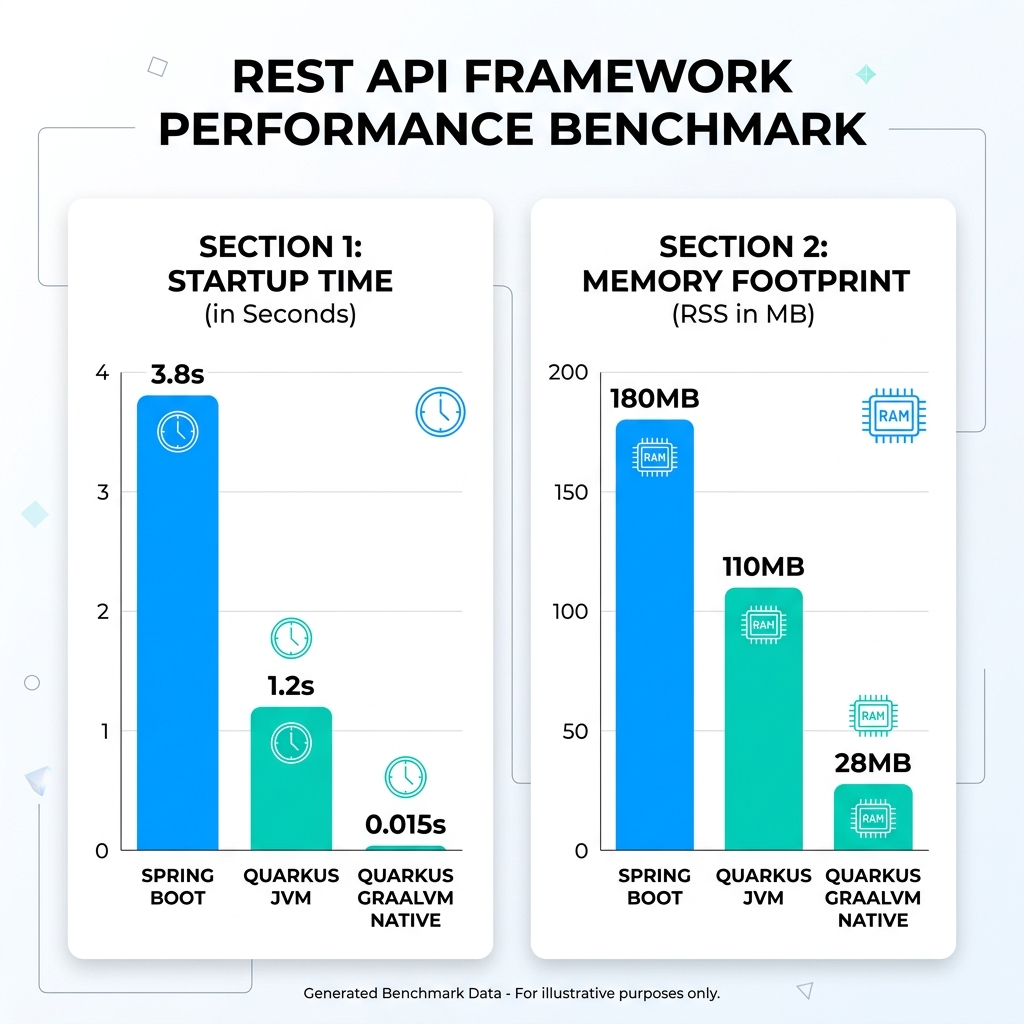
11. Benchmark di prestazioni: Quarkus vs Spring Boot
| Metrica Benchmark | Spring Boot (JVM) | Quarkus (OpenJDK JVM) | Quarkus (GraalVM Native) | Miglioramento |
|---|---|---|---|---|
| Tempo di avvio (Cold Start) | 3,82 secondi | 1,18 secondi | 0,015 secondi | 254 volte più veloce |
| Impronta di memoria (RSS) | 184 MB | 108 MB | 28 MB | 84% riduzione memoria |
12. Conclusione e Best Practices
Quarkus ha ridefinito ciò che è possibile con Java aziendale.
Tags
Empower Your Digital Presence & Workflows
Explore top-tier tools built by Ghaznix to streamline your links, surveys, and brand growth.