REST-APIs mit Java Quarkus erstellen: Leitfaden für hochleistungsfähige, reaktive und Cloud-native Anwendungen
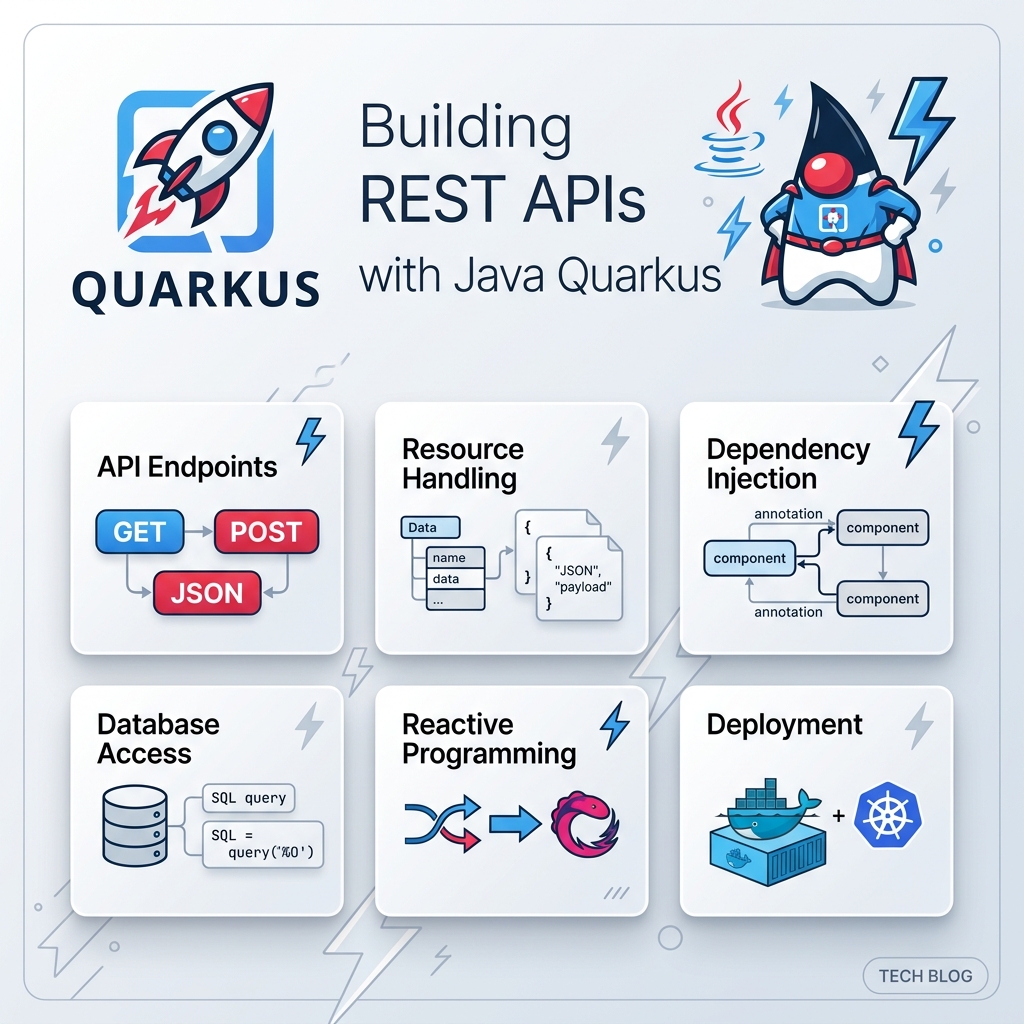
In der modernen Unternehmenssoftwareentwicklung ist die Erstellung von RESTful-APIs der Grundstein der Backend-Systementwicklung. Jahrzehntelang verließen sich Java-Entwickler auf traditionelle Frameworks wie Spring Boot oder Jakarta EE, um RESTful Web Services bereitzustellen. Da sich Cloud Computing jedoch in Richtung containerisierter Umgebungen (Docker, Kubernetes) und Serverless (AWS Lambda, Knative) entwickelte, zeigten traditionelle Java-Backends zwei wesentliche Engpässe: langsame Startzeiten (Kaltstarts) und einen hohen Speicherbedarf (RSS).
Hier kommt Quarkus ins Spiel—das Supersonic Subatomic Java Framework, das speziell für OpenJDK HotSpot und GraalVM entwickelt wurde. Quarkus wurde von Grund auf für Kubernetes konzipiert und verändert grundlegend, wie Java-Anwendungen Metadaten verarbeiten, Abhängigkeiten verwalten und Code ausführen.
1. Warum Quarkus für Java-REST-APIs wählen?
Bevor wir Code schreiben, ist es wichtig zu verstehen, warum Entwickler Quarkus gegenüber herkömmlichen Java-Frameworks bevorzugen.
A. Das RESTEasy Reactive-Paradigma
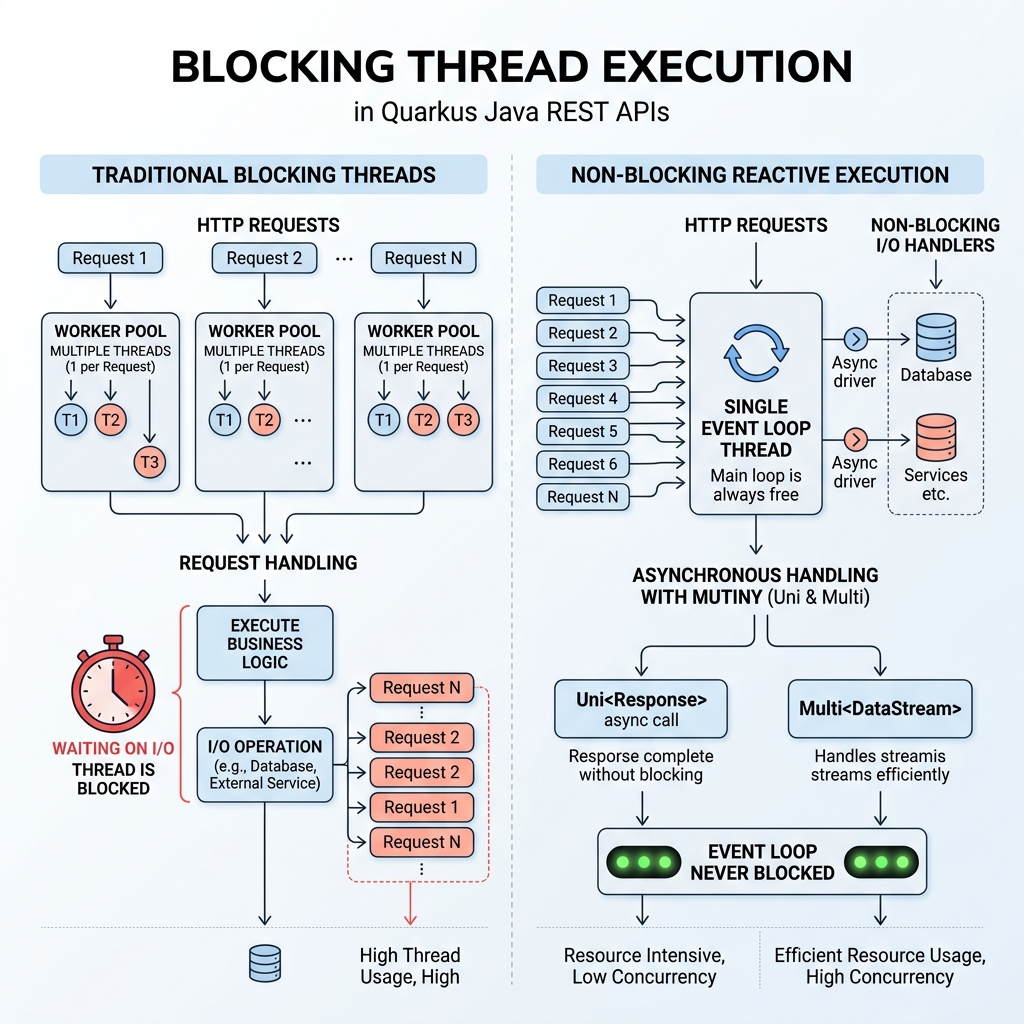
Herkömmliche REST-Frameworks verwenden ein Thread-pro-Anfrage-Modell auf der Grundlage synchroner Servlet-APIs.
B. Dev Services & Live Coding ohne Konfiguration
- Live Coding (
quarkus dev): Änderungen werden in Millisekunden neu geladen. - Dev Services: Startet automatisch Docker-Container für Datenbanken.
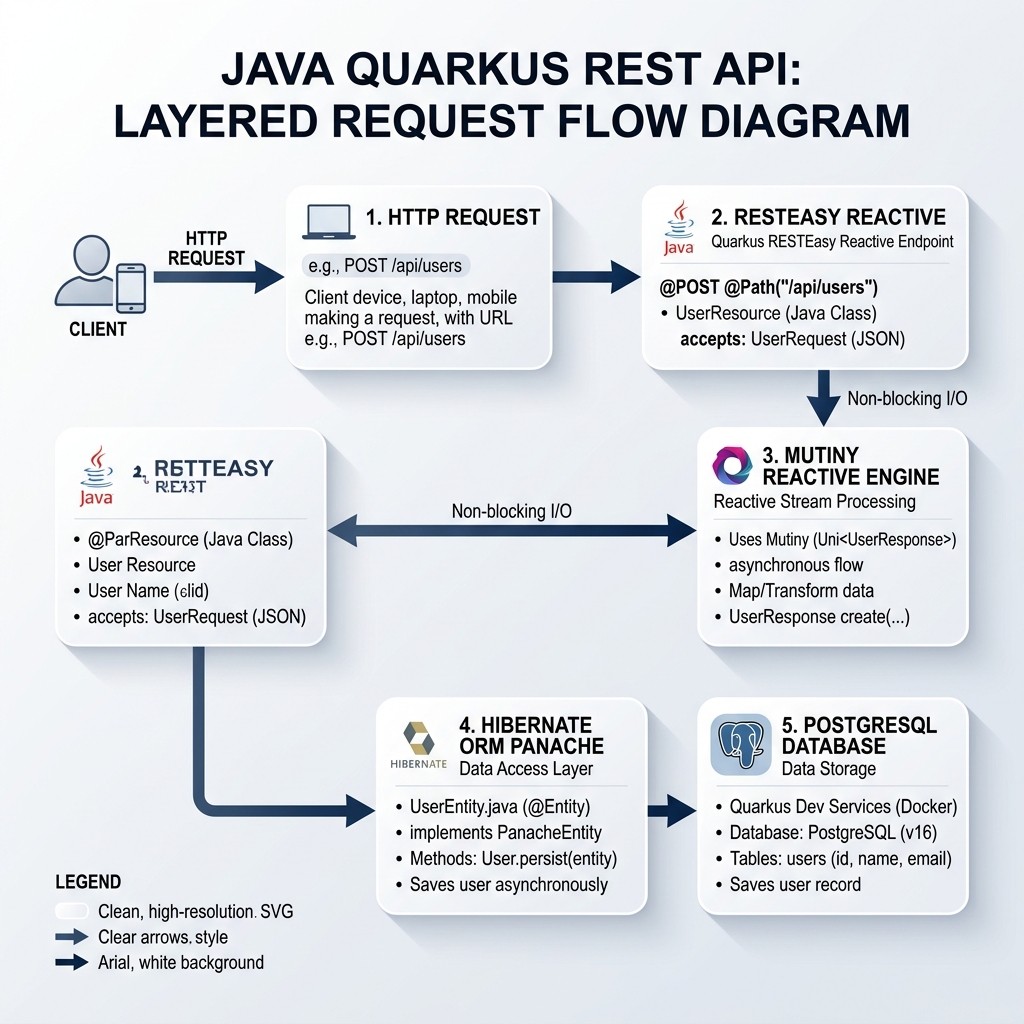
2. Quarkus-REST-API-Architektur
Eine moderne Quarkus-REST-API folgt einer schlanken, mehrschichtigen Architektur.
3. Projektinitialisierung & Abhängigkeiten
Führen Sie den folgenden Befehl im Terminal aus:
mvn io.quarkus.platform:quarkus-maven-plugin:3.15.0:create \
    -DprojectGroupId=com.ghaznix.api \
    -DprojectArtifactId=quarkus-product-api \
    -DclassName="com.ghaznix.api.ProductResource" \
    -Dpath="/api/products" \
    -Dextensions="resteasy-reactive-jackson,hibernate-orm-panache,jdbc-postgresql,hibernate-validator,smallrye-openapi"
4. Anwendungseigenschaften konfigurieren
# Application Configuration
quarkus.application.name=quarkus-product-api
quarkus.http.port=8080

# Database Configuration (Dev Services will override in dev mode automatically)
quarkus.datasource.db-kind=postgresql
quarkus.datasource.username=postgres
quarkus.datasource.password=secret
quarkus.datasource.jdbc.url=jdbc:postgresql://localhost:5432/product_db

# Hibernate ORM Configuration
quarkus.hibernate-orm.database.generation=drop-and-create
quarkus.hibernate-orm.log.sql=true

# Swagger UI & OpenAPI Path
quarkus.swagger-ui.always-include=true
quarkus.swagger-ui.path=/swagger-ui
5. Domänenmodell & Active Record mit Panache
package com.ghaznix.api;

import io.quarkus.hibernate.orm.panache.PanacheEntity;
import jakarta.persistence.Column;
import jakarta.persistence.Entity;
import jakarta.persistence.Table;
import jakarta.validation.constraints.Min;
import jakarta.validation.constraints.NotBlank;
import jakarta.validation.constraints.NotNull;
import java.math.BigDecimal;
import java.util.List;

@Entity
@Table(name = "products")
public class Product extends PanacheEntity {

    @NotBlank(message = "Product name cannot be blank")
    @Column(nullable = false)
    public String name;

    @Column(length = 1000)
    public String description;

    @NotNull(message = "Price is required")
    @Min(value = 0, message = "Price must be non-negative")
    @Column(nullable = false)
    public BigDecimal price;

    @Column(nullable = false)
    public Integer stockQuantity;

    public String category;

    // Static Finder Utility Methods powered by Panache
    public static List<Product> findByCategory(String category) {
        return list("category", category);
    }

    public static List<Product> findAvailableProducts() {
        return list("stockQuantity > 0");
    }
}
6. Erstellung von REST-Endpunkten für den Produktionseinsatz
package com.ghaznix.api;

import io.quarkus.panache.common.Page;
import io.quarkus.panache.common.Sort;
import jakarta.transaction.Transactional;
import jakarta.validation.Valid;
import jakarta.ws.rs.*;
import jakarta.ws.rs.core.MediaType;
import jakarta.ws.rs.core.Response;
import org.eclipse.microprofile.openapi.annotations.Operation;
import org.eclipse.microprofile.openapi.annotations.responses.APIResponse;
import org.eclipse.microprofile.openapi.annotations.tags.Tag;

import java.net.URI;
import java.util.List;

@Path("/api/products")
@Produces(MediaType.APPLICATION_JSON)
@Consumes(MediaType.APPLICATION_JSON)
@Tag(name = "Product REST API", description = "Operations for managing catalog products")
public class ProductResource {

    @GET
    @Operation(summary = "Get all products with pagination")
    @APIResponse(responseCode = "200", description = "List of products retrieved successfully")
    public List<Product> getAllProducts(
            @QueryParam("page") @DefaultValue("0") int pageIndex,
            @QueryParam("size") @DefaultValue("10") int pageSize,
            @QueryParam("sort") @DefaultValue("name") String sortBy) {

        return Product.findAll(Sort.by(sortBy))
                      .page(Page.of(pageIndex, pageSize))
                      .list();
    }

    @GET
    @Path("/{id}")
    @Operation(summary = "Get product by ID")
    @APIResponse(responseCode = "200", description = "Product details found")
    @APIResponse(responseCode = "404", description = "Product not found")
    public Product getProductById(@PathParam("id") Long id) {
        Product product = Product.findById(id);
        if (product == null) {
            throw new NotFoundException("Product with ID " + id + " does not exist.");
        }
        return product;
    }

    @POST
    @Transactional
    @Operation(summary = "Create a new product")
    @APIResponse(responseCode = "201", description = "Product created successfully")
    @APIResponse(responseCode = "400", description = "Invalid request payload")
    public Response createProduct(@Valid Product product) {
        product.persist();
        return Response.created(URI.create("/api/products/" + product.id))
                       .entity(product)
                       .build();
    }

    @PUT
    @Path("/{id}")
    @Transactional
    @Operation(summary = "Update an existing product")
    @APIResponse(responseCode = "200", description = "Product updated")
    @APIResponse(responseCode = "404", description = "Product ID not found")
    public Product updateProduct(@PathParam("id") Long id, @Valid Product updatedProduct) {
        Product entity = Product.findById(id);
        if (entity == null) {
            throw new NotFoundException("Product with ID " + id + " not found.");
        }

        entity.name = updatedProduct.name;
        entity.description = updatedProduct.description;
        entity.price = updatedProduct.price;
        entity.stockQuantity = updatedProduct.stockQuantity;
        entity.category = updatedProduct.category;

        return entity;
    }

    @DELETE
    @Path("/{id}")
    @Transactional
    @Operation(summary = "Delete a product by ID")
    @APIResponse(responseCode = "204", description = "Product deleted successfully")
    @APIResponse(responseCode = "404", description = "Product ID not found")
    public Response deleteProduct(@PathParam("id") Long id) {
        boolean deleted = Product.deleteById(id);
        if (!deleted) {
            throw new NotFoundException("Product with ID " + id + " not found.");
        }
        return Response.noContent().build();
    }
}
7. Reaktive REST-Endpunkte vs. Blockierende Ausführung
import io.smallrye.mutiny.Uni;
import io.smallrye.mutiny.Multi;

@GET
@Path("/reactive/{id}")
public Uni<Product> getProductReactive(@PathParam("id") Long id) {
    return Product.<Product>findByIdAsync(id)
            .onItem().ifNull().failWith(new NotFoundException("Product not found"));
}

@GET
@Path("/stream")
@Produces(MediaType.SERVER_SENT_EVENTS)
public Multi<Product> streamProducts() {
    return Product.streamAll();
}
8. Globale Fehlerbehandlung & Fehlerstandard
package com.ghaznix.api.exception;

import jakarta.ws.rs.NotFoundException;
import jakarta.ws.rs.core.MediaType;
import jakarta.ws.rs.core.Response;
import jakarta.ws.rs.ext.ExceptionMapper;
import jakarta.ws.rs.ext.Provider;
import java.time.Instant;
import java.util.HashMap;
import java.util.Map;

@Provider
public class GlobalExceptionMapper implements ExceptionMapper<Exception> {

    @Override
    public Response toResponse(Exception exception) {
        Map<String, Object> errorPayload = new HashMap<>();
        errorPayload.put("timestamp", Instant.now().toString());

        if (exception instanceof NotFoundException) {
            errorPayload.put("status", 404);
            errorPayload.put("error", "Not Found");
            errorPayload.put("message", exception.getMessage());
            return Response.status(Response.Status.NOT_FOUND)
                           .entity(errorPayload)
                           .type(MediaType.APPLICATION_JSON)
                           .build();
        }

        errorPayload.put("status", 500);
        errorPayload.put("error", "Internal Server Error");
        errorPayload.put("message", exception.getMessage());

        return Response.status(Response.Status.INTERNAL_SERVER_ERROR)
                       .entity(errorPayload)
                       .type(MediaType.APPLICATION_JSON)
                       .build();
    }
}
9. Automatisierte Tests mit @QuarkusTest & REST Assured
package com.ghaznix.api;

import io.quarkus.test.junit.QuarkusTest;
import io.restassured.http.ContentType;
import org.junit.jupiter.api.Test;

import static io.restassured.RestAssured.given;
import static org.hamcrest.CoreMatchers.*;

@QuarkusTest
public class ProductResourceTest {

    @Test
    public void testGetAllProductsEndpoint() {
        given()
          .when().get("/api/products")
          .then()
             .statusCode(200)
             .contentType(ContentType.JSON);
    }

    @Test
    public void testCreateAndGetProduct() {
        Product product = new Product();
        product.name = "Gaming Laptop";
        product.description = "High-performance GPU laptop";
        product.price = new java.math.BigDecimal("1499.99");
        product.stockQuantity = 15;
        product.category = "Electronics";

        // Test POST Endpoint
        Integer createdId = given()
            .contentType(ContentType.JSON)
            .body(product)
            .when().post("/api/products")
            .then()
                .statusCode(201)
                .body("name", equalTo("Gaming Laptop"))
                .extract().path("id");

        // Test GET Endpoint by ID
        given()
            .pathParam("id", createdId)
            .when().get("/api/products/{id}")
            .then()
                .statusCode(200)
                .body("category", equalTo("Electronics"));
    }
}
./mvnw test
10. Paketierung & Kompilierung in eine native GraalVM-Binärdatei
./mvnw quarkus:dev
./mvnw package
java -jar target/quarkus-app/quarkus-run.jar
./mvnw package -Dnative -Dquarkus.native.container-build=true
./target/quarkus-product-api-1.0.0-runner
2026-09-21 22:30:00,014 INFO [io.quarkus] (main) quarkus-product-api 1.0.0-runner native (powered by Quarkus 3.15.0) started in 0.018s. Listening on: http://0.0.0.0:8080
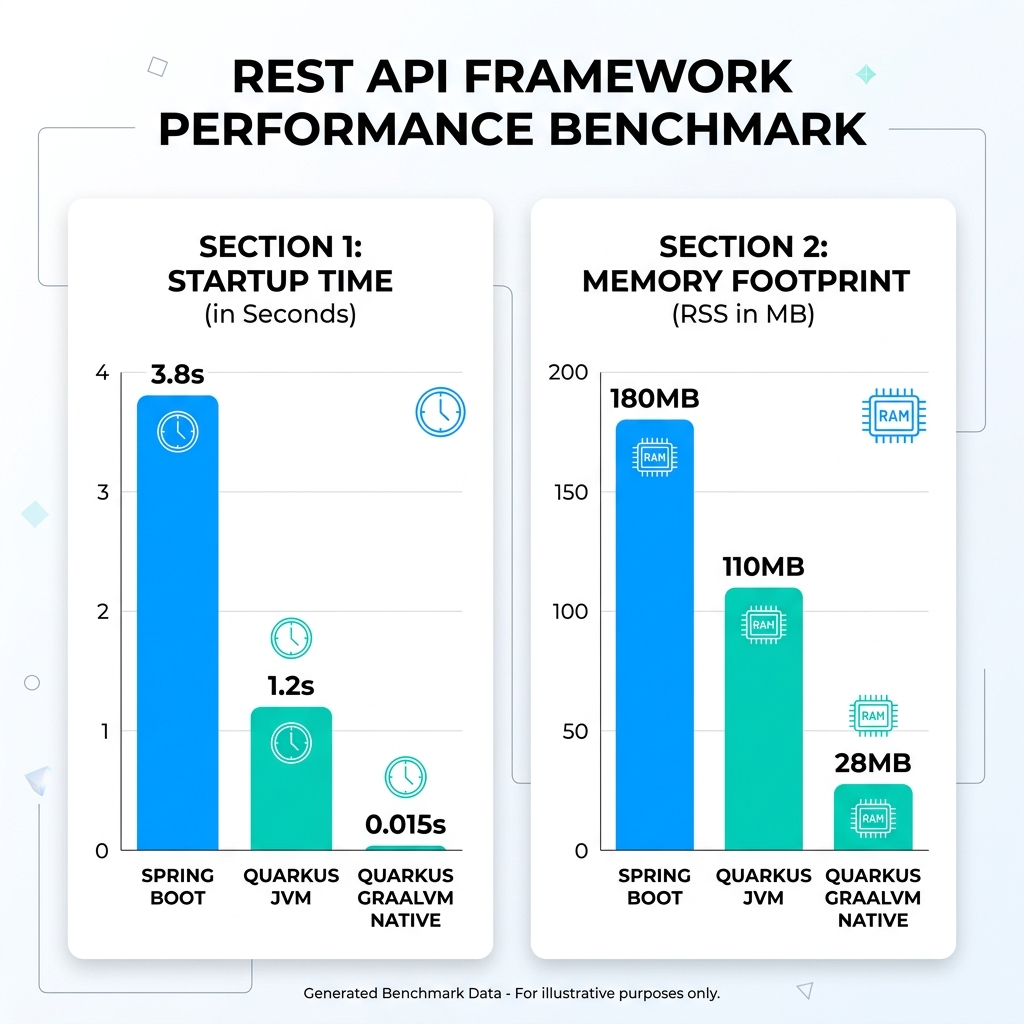
11. Leistungsbenchmarks: Quarkus vs. Spring Boot
| Benchmark-Metrik | Spring Boot (JVM) | Quarkus (OpenJDK JVM) | Quarkus (GraalVM Native) | Verbesserung |
|---|---|---|---|---|
| Startzeit (Kaltstart) | 3,82 Sekunden | 1,18 Sekunden | 0,015 Sekunden | 254-mal schneller |
| Arbeitsspeicherbedarf (RSS) | 184 MB | 108 MB | 28 MB | 84% Speicherreduzierung |
12. Fazit & Best Practices
Quarkus hat neu definiert, was mit Enterprise-Java möglich ist.
Tags
Empower Your Digital Presence & Workflows
Explore top-tier tools built by Ghaznix to streamline your links, surveys, and brand growth.