Création d'API REST avec Java Quarkus : Guide haute performance, réactif et Cloud-Native
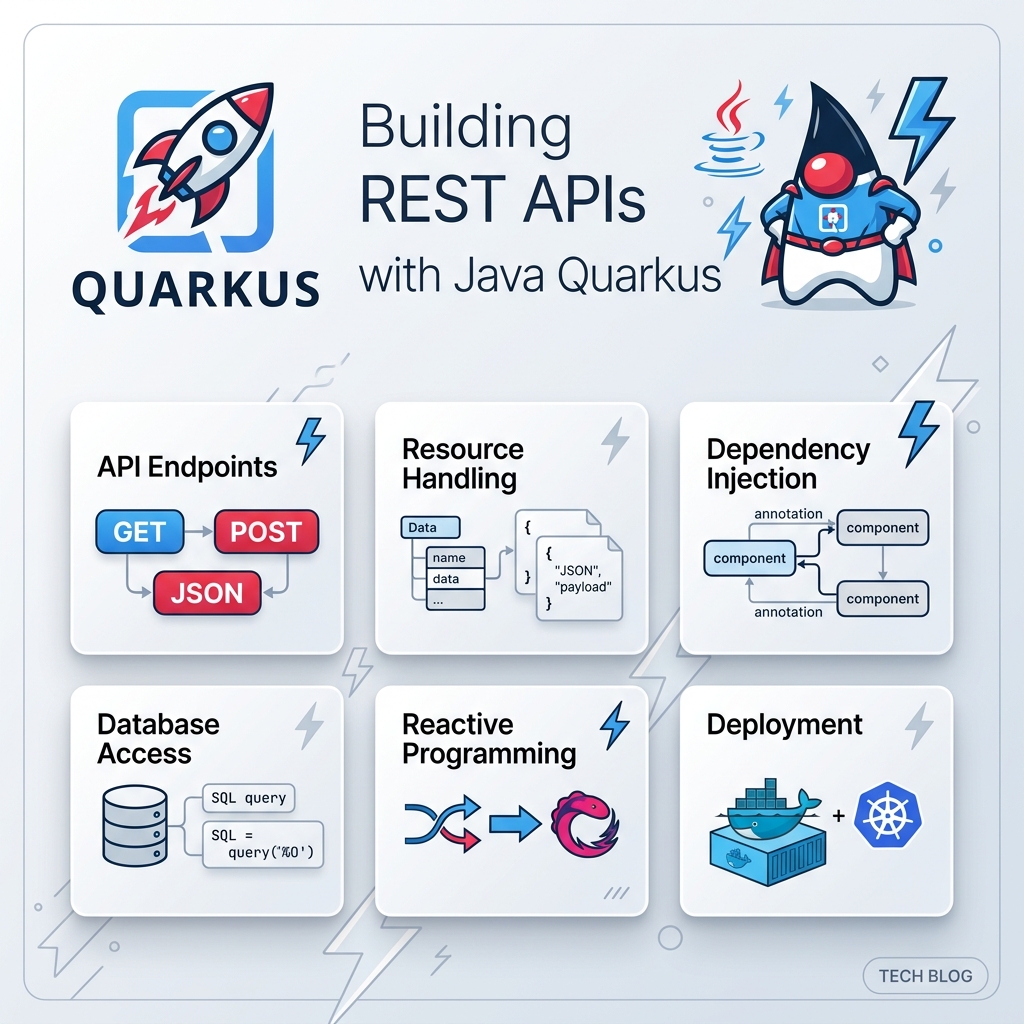
Dans l’ingénierie logicielle d’entreprise moderne, la création d’API RESTful constitue la pierre angulaire du développement des systèmes backend. Pendant des décennies, les développeurs Java se sont appuyés sur des frameworks traditionnels tels que Spring Boot ou Jakarta EE.
Voici Quarkus—le framework Supersonic Subatomic Java conçu sur mesure pour OpenJDK HotSpot et GraalVM.
1. Pourquoi choisir Quarkus pour vos API REST Java ?
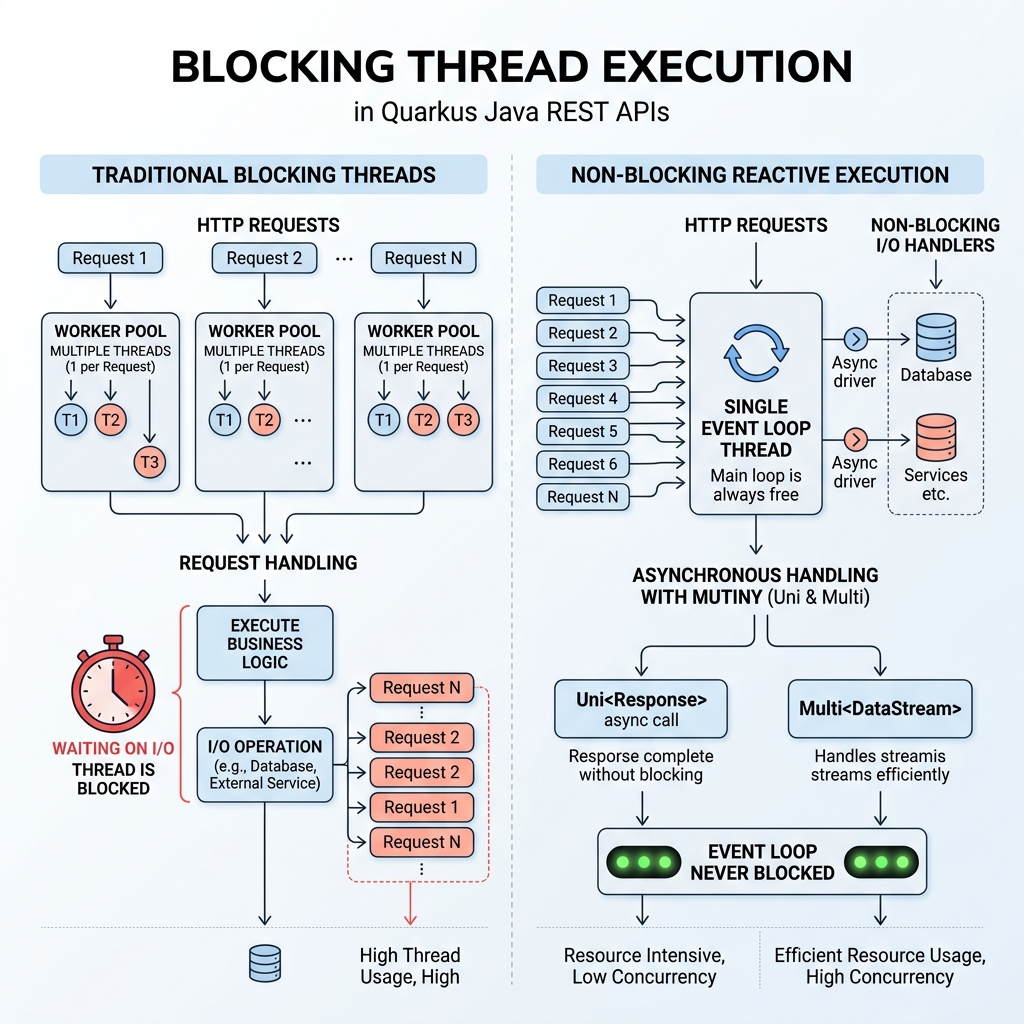
A. Le paradigme réactif RESTEasy
B. Dev Services & Live Coding sans configuration
2. Architecture d’une API REST Quarkus
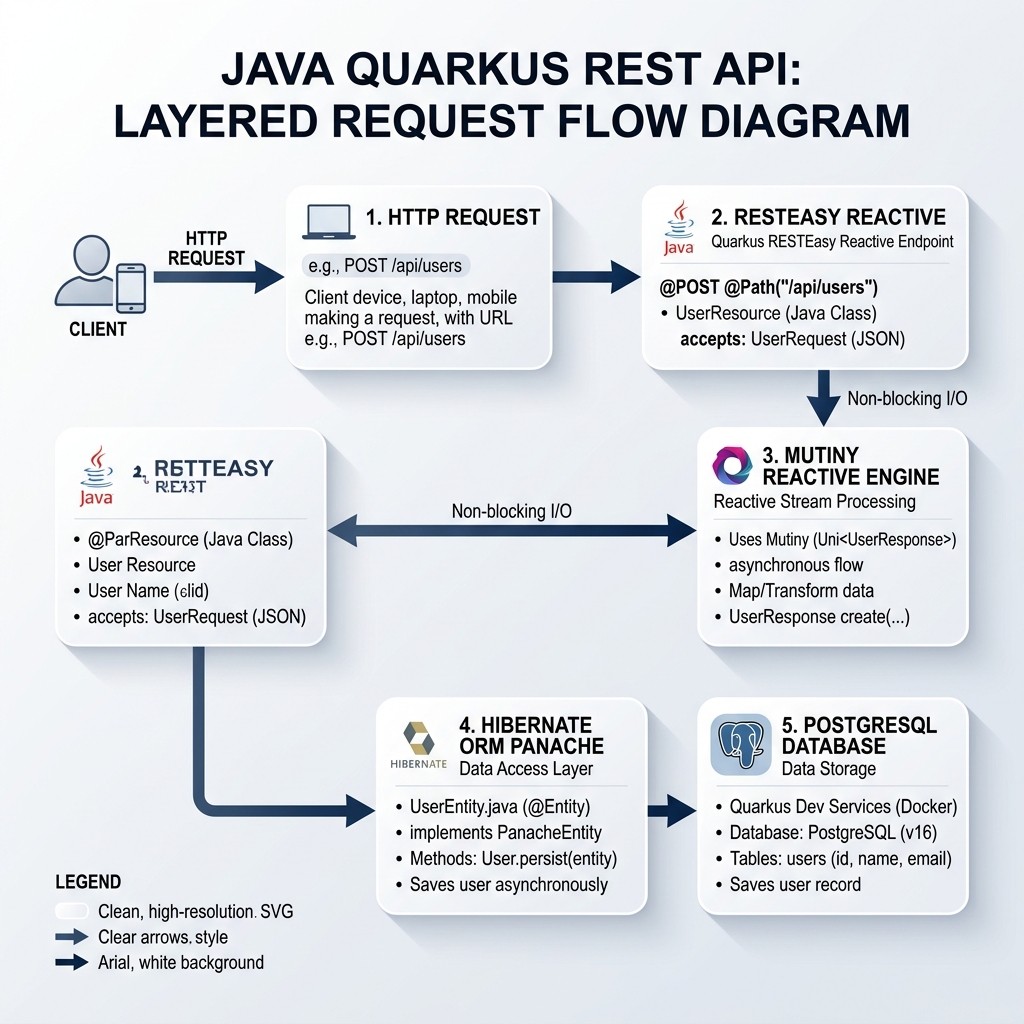
3. Initialisation du projet et dépendances
mvn io.quarkus.platform:quarkus-maven-plugin:3.15.0:create \
    -DprojectGroupId=com.ghaznix.api \
    -DprojectArtifactId=quarkus-product-api \
    -DclassName="com.ghaznix.api.ProductResource" \
    -Dpath="/api/products" \
    -Dextensions="resteasy-reactive-jackson,hibernate-orm-panache,jdbc-postgresql,hibernate-validator,smallrye-openapi"
4. Configuration des propriétés de l’application
# Application Configuration
quarkus.application.name=quarkus-product-api
quarkus.http.port=8080

# Database Configuration (Dev Services will override in dev mode automatically)
quarkus.datasource.db-kind=postgresql
quarkus.datasource.username=postgres
quarkus.datasource.password=secret
quarkus.datasource.jdbc.url=jdbc:postgresql://localhost:5432/product_db

# Hibernate ORM Configuration
quarkus.hibernate-orm.database.generation=drop-and-create
quarkus.hibernate-orm.log.sql=true

# Swagger UI & OpenAPI Path
quarkus.swagger-ui.always-include=true
quarkus.swagger-ui.path=/swagger-ui
5. Modèle de domaine et Active Record avec Panache
package com.ghaznix.api;

import io.quarkus.hibernate.orm.panache.PanacheEntity;
import jakarta.persistence.Column;
import jakarta.persistence.Entity;
import jakarta.persistence.Table;
import jakarta.validation.constraints.Min;
import jakarta.validation.constraints.NotBlank;
import jakarta.validation.constraints.NotNull;
import java.math.BigDecimal;
import java.util.List;

@Entity
@Table(name = "products")
public class Product extends PanacheEntity {

    @NotBlank(message = "Product name cannot be blank")
    @Column(nullable = false)
    public String name;

    @Column(length = 1000)
    public String description;

    @NotNull(message = "Price is required")
    @Min(value = 0, message = "Price must be non-negative")
    @Column(nullable = false)
    public BigDecimal price;

    @Column(nullable = false)
    public Integer stockQuantity;

    public String category;

    // Static Finder Utility Methods powered by Panache
    public static List<Product> findByCategory(String category) {
        return list("category", category);
    }

    public static List<Product> findAvailableProducts() {
        return list("stockQuantity > 0");
    }
}
6. Création de contrôleurs REST pour la production
package com.ghaznix.api;

import io.quarkus.panache.common.Page;
import io.quarkus.panache.common.Sort;
import jakarta.transaction.Transactional;
import jakarta.validation.Valid;
import jakarta.ws.rs.*;
import jakarta.ws.rs.core.MediaType;
import jakarta.ws.rs.core.Response;
import org.eclipse.microprofile.openapi.annotations.Operation;
import org.eclipse.microprofile.openapi.annotations.responses.APIResponse;
import org.eclipse.microprofile.openapi.annotations.tags.Tag;

import java.net.URI;
import java.util.List;

@Path("/api/products")
@Produces(MediaType.APPLICATION_JSON)
@Consumes(MediaType.APPLICATION_JSON)
@Tag(name = "Product REST API", description = "Operations for managing catalog products")
public class ProductResource {

    @GET
    @Operation(summary = "Get all products with pagination")
    @APIResponse(responseCode = "200", description = "List of products retrieved successfully")
    public List<Product> getAllProducts(
            @QueryParam("page") @DefaultValue("0") int pageIndex,
            @QueryParam("size") @DefaultValue("10") int pageSize,
            @QueryParam("sort") @DefaultValue("name") String sortBy) {

        return Product.findAll(Sort.by(sortBy))
                      .page(Page.of(pageIndex, pageSize))
                      .list();
    }

    @GET
    @Path("/{id}")
    @Operation(summary = "Get product by ID")
    @APIResponse(responseCode = "200", description = "Product details found")
    @APIResponse(responseCode = "404", description = "Product not found")
    public Product getProductById(@PathParam("id") Long id) {
        Product product = Product.findById(id);
        if (product == null) {
            throw new NotFoundException("Product with ID " + id + " does not exist.");
        }
        return product;
    }

    @POST
    @Transactional
    @Operation(summary = "Create a new product")
    @APIResponse(responseCode = "201", description = "Product created successfully")
    @APIResponse(responseCode = "400", description = "Invalid request payload")
    public Response createProduct(@Valid Product product) {
        product.persist();
        return Response.created(URI.create("/api/products/" + product.id))
                       .entity(product)
                       .build();
    }

    @PUT
    @Path("/{id}")
    @Transactional
    @Operation(summary = "Update an existing product")
    @APIResponse(responseCode = "200", description = "Product updated")
    @APIResponse(responseCode = "404", description = "Product ID not found")
    public Product updateProduct(@PathParam("id") Long id, @Valid Product updatedProduct) {
        Product entity = Product.findById(id);
        if (entity == null) {
            throw new NotFoundException("Product with ID " + id + " not found.");
        }

        entity.name = updatedProduct.name;
        entity.description = updatedProduct.description;
        entity.price = updatedProduct.price;
        entity.stockQuantity = updatedProduct.stockQuantity;
        entity.category = updatedProduct.category;

        return entity;
    }

    @DELETE
    @Path("/{id}")
    @Transactional
    @Operation(summary = "Delete a product by ID")
    @APIResponse(responseCode = "204", description = "Product deleted successfully")
    @APIResponse(responseCode = "404", description = "Product ID not found")
    public Response deleteProduct(@PathParam("id") Long id) {
        boolean deleted = Product.deleteById(id);
        if (!deleted) {
            throw new NotFoundException("Product with ID " + id + " not found.");
        }
        return Response.noContent().build();
    }
}
7. Points de terminaison réactifs vs Exécution bloquante
import io.smallrye.mutiny.Uni;
import io.smallrye.mutiny.Multi;

@GET
@Path("/reactive/{id}")
public Uni<Product> getProductReactive(@PathParam("id") Long id) {
    return Product.<Product>findByIdAsync(id)
            .onItem().ifNull().failWith(new NotFoundException("Product not found"));
}

@GET
@Path("/stream")
@Produces(MediaType.SERVER_SENT_EVENTS)
public Multi<Product> streamProducts() {
    return Product.streamAll();
}
8. Gestion globale des exceptions
package com.ghaznix.api.exception;

import jakarta.ws.rs.NotFoundException;
import jakarta.ws.rs.core.MediaType;
import jakarta.ws.rs.core.Response;
import jakarta.ws.rs.ext.ExceptionMapper;
import jakarta.ws.rs.ext.Provider;
import java.time.Instant;
import java.util.HashMap;
import java.util.Map;

@Provider
public class GlobalExceptionMapper implements ExceptionMapper<Exception> {

    @Override
    public Response toResponse(Exception exception) {
        Map<String, Object> errorPayload = new HashMap<>();
        errorPayload.put("timestamp", Instant.now().toString());

        if (exception instanceof NotFoundException) {
            errorPayload.put("status", 404);
            errorPayload.put("error", "Not Found");
            errorPayload.put("message", exception.getMessage());
            return Response.status(Response.Status.NOT_FOUND)
                           .entity(errorPayload)
                           .type(MediaType.APPLICATION_JSON)
                           .build();
        }

        errorPayload.put("status", 500);
        errorPayload.put("error", "Internal Server Error");
        errorPayload.put("message", exception.getMessage());

        return Response.status(Response.Status.INTERNAL_SERVER_ERROR)
                       .entity(errorPayload)
                       .type(MediaType.APPLICATION_JSON)
                       .build();
    }
}
9. Tests automatisés avec @QuarkusTest & REST Assured
package com.ghaznix.api;

import io.quarkus.test.junit.QuarkusTest;
import io.restassured.http.ContentType;
import org.junit.jupiter.api.Test;

import static io.restassured.RestAssured.given;
import static org.hamcrest.CoreMatchers.*;

@QuarkusTest
public class ProductResourceTest {

    @Test
    public void testGetAllProductsEndpoint() {
        given()
          .when().get("/api/products")
          .then()
             .statusCode(200)
             .contentType(ContentType.JSON);
    }

    @Test
    public void testCreateAndGetProduct() {
        Product product = new Product();
        product.name = "Gaming Laptop";
        product.description = "High-performance GPU laptop";
        product.price = new java.math.BigDecimal("1499.99");
        product.stockQuantity = 15;
        product.category = "Electronics";

        // Test POST Endpoint
        Integer createdId = given()
            .contentType(ContentType.JSON)
            .body(product)
            .when().post("/api/products")
            .then()
                .statusCode(201)
                .body("name", equalTo("Gaming Laptop"))
                .extract().path("id");

        // Test GET Endpoint by ID
        given()
            .pathParam("id", createdId)
            .when().get("/api/products/{id}")
            .then()
                .statusCode(200)
                .body("category", equalTo("Electronics"));
    }
}
./mvnw test
10. Emballage et compilation native GraalVM
./mvnw quarkus:dev
./mvnw package
java -jar target/quarkus-app/quarkus-run.jar
./mvnw package -Dnative -Dquarkus.native.container-build=true
./target/quarkus-product-api-1.0.0-runner
2026-09-21 22:30:00,014 INFO [io.quarkus] (main) quarkus-product-api 1.0.0-runner native (powered by Quarkus 3.15.0) started in 0.018s. Listening on: http://0.0.0.0:8080
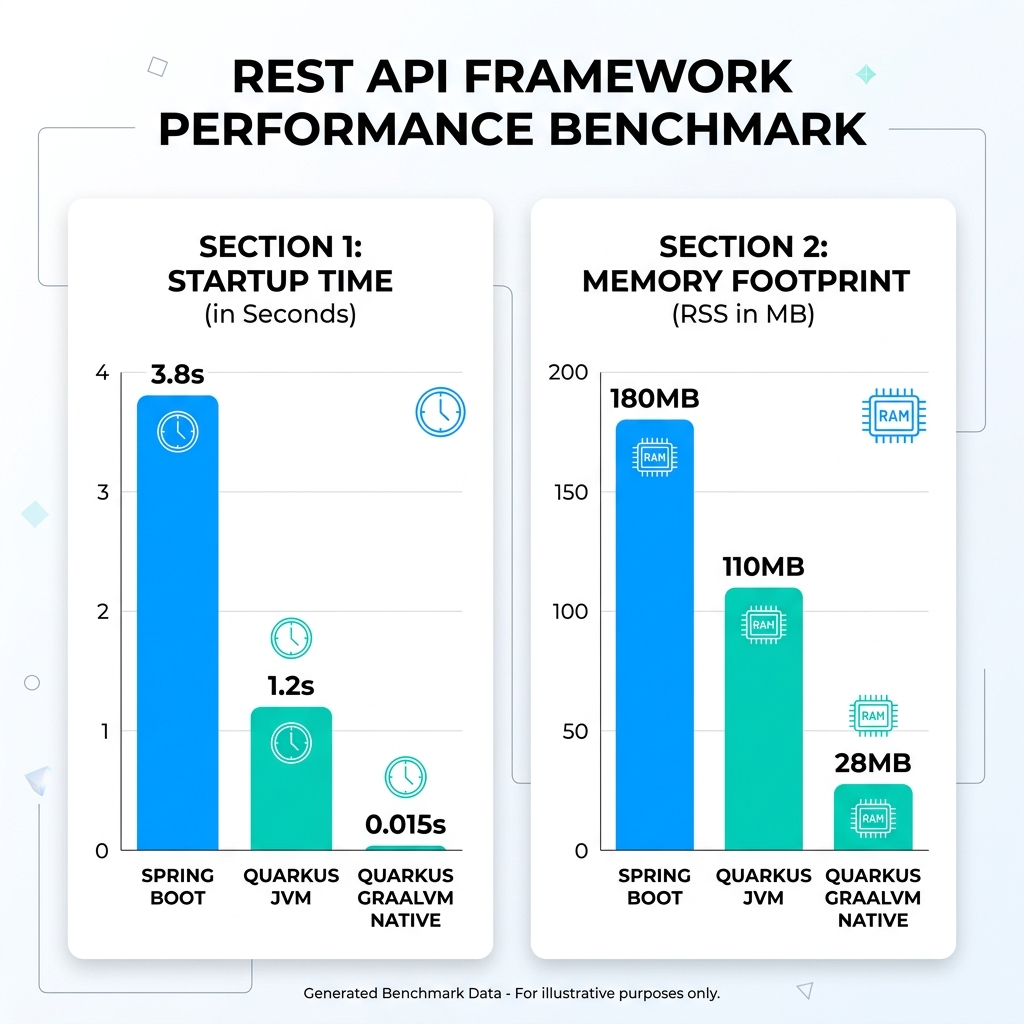
11. Benchmarks de performance : Quarkus vs Spring Boot
| Métrique de benchmark | Spring Boot (JVM) | Quarkus (OpenJDK JVM) | Quarkus (GraalVM Native) | Amélioration |
|---|---|---|---|---|
| Temps de démarrage (à froid) | 3,82 secondes | 1,18 seconde | 0,015 seconde | 254x plus rapide |
| Empreinte mémoire (RSS) | 184 Mo | 108 Mo | 28 Mo | 84% d’économie mémoire |
12. Conclusion & Bonnes Pratiques
Tags
Ghaznix Ecosystem Products
Empower Your Digital Presence & Workflows
Explore top-tier tools built by Ghaznix to streamline your links, surveys, and brand growth.