Understanding the API Gateway Pattern in Microservices: A Simple Guide
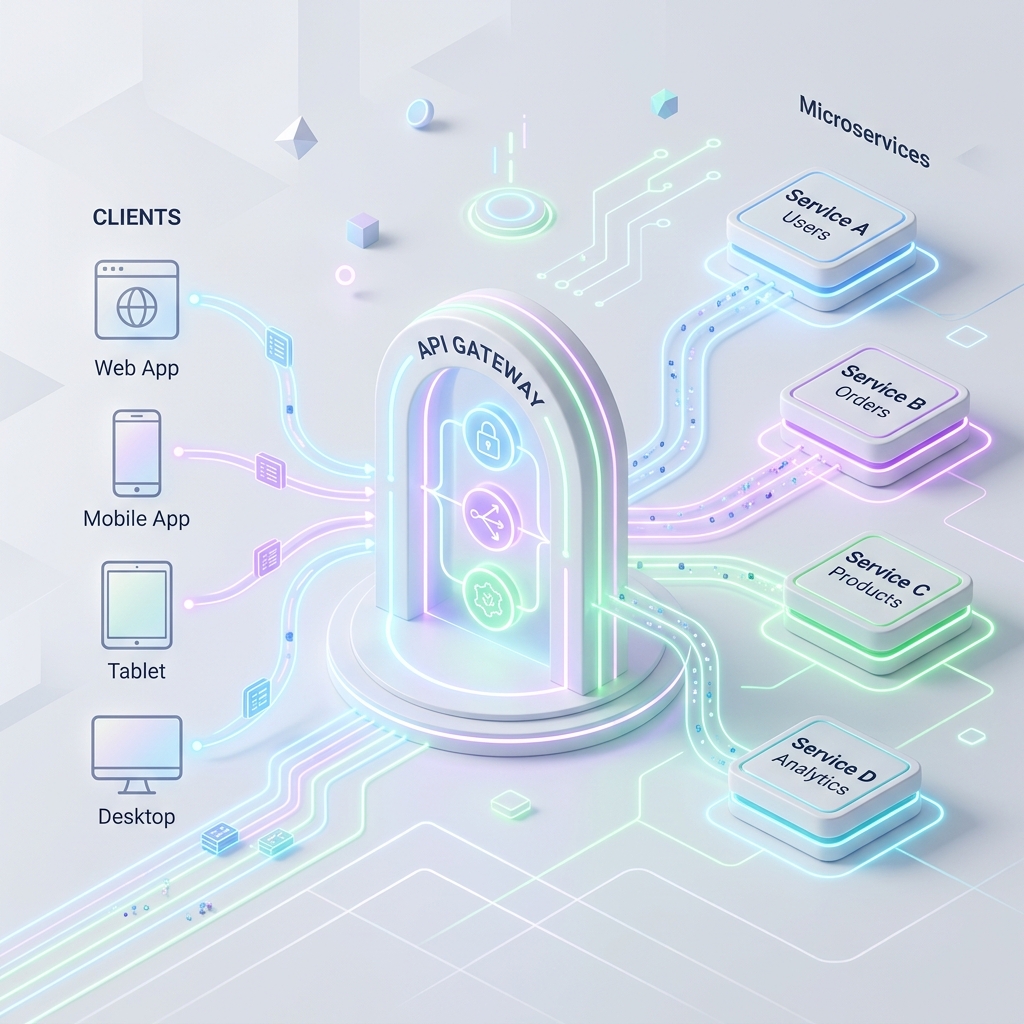
Transitioning from a single, monolithic application to a microservices architecture solves many problems. It allows teams to work independently, deploy services separately, and scale parts of the system as needed. However, it also introduces a new challenge: how do clients interact with all these independent services?
If you have ten, fifty, or hundreds of tiny microservices, should a mobile app or web page connect to each one of them directly?
This is where the API Gateway Pattern comes in. In this guide, we will break down what an API Gateway is, why you need it, and how it simplifies your microservices system using simple words and real-world analogies.
The Real-World Analogy: The Hotel Receptionist
Imagine you are checking into a large, luxury resort hotel. The resort has many different departments:
- Housekeeping (for clean sheets)
- Room Service (for food)
- Concierge (for booking tours)
- Billing (for paying the bill)
If you want a clean towel, you don’t walk through the resort trying to find the housekeeping building. If you want dinner, you don’t knock on the kitchen door. Instead, you call the front desk receptionist.
The receptionist listens to your request, determines which department can solve it, and connects you or handles it for you.
In this scenario:
- You are the Client (Mobile App or Browser).
- The receptionist is the API Gateway.
- The departments (Housekeeping, Room Service, Billing) are the Microservices.
The Problem: Direct Client-to-Service Communication
Before looking at how the gateway works, let’s see what happens if we don’t use one.
Suppose your e-commerce application has three separate microservices:
- User Service (manages profiles)
- Product Service (manages catalog)
- Order Service (manages checkout)
Without an API Gateway, the client app has to send separate requests directly to each service’s individual address (IP or URL):
This direct connection approach creates several major headaches:
- Too Many Endpoints: The client app must remember three separate URLs. If you split a service or change its address, you have to update the client application.
- Security Nightmare: Each microservice must separately implement authentication (checking login tokens), SSL certificates, and firewall rules.
- Network Overhead: The client might need to make three separate network requests over slow mobile networks just to load a single page (e.g., fetch profile, fetch product details, and fetch order history).
- Protocol Differences: Your client app might prefer using standard web protocols like HTTP/JSON, but your internal services might communicate faster using specialized protocols like gRPC or AMQP.
The Solution: The API Gateway Pattern
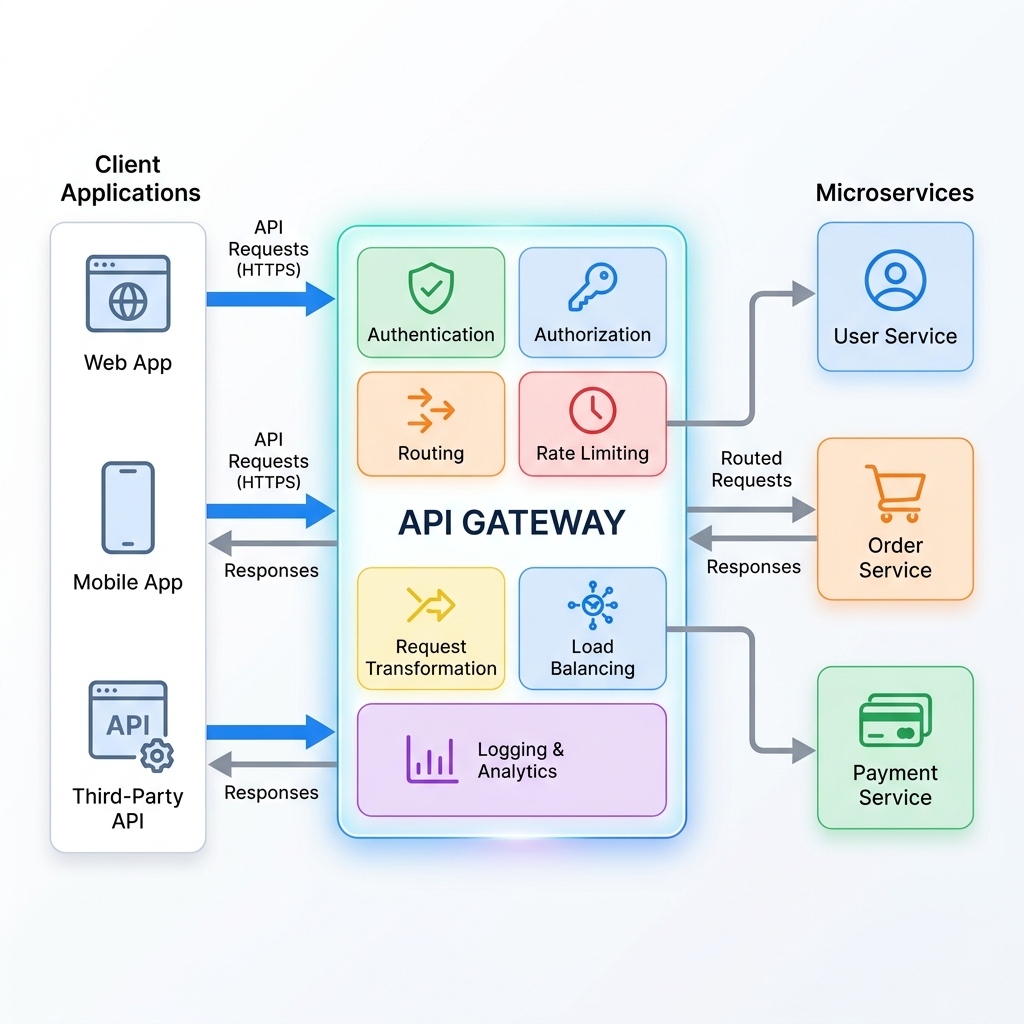
An API Gateway is a helper server that sits between the client applications and the internal microservices. It acts as the single point of entry for all incoming requests.
Instead of calling three different services, the client makes one call to the API Gateway. The gateway then forwards the request to the correct internal service, collects the results, and sends them back to the client.
Key Responsibilities of an API Gateway
An API Gateway does much more than just direct traffic. It takes care of “cross-cutting concerns”—tasks that every microservice would otherwise have to write code for:
- Routing: The gateway takes an incoming URL (like
/api/v1/orders) and maps it to the correct internal service address. - Authentication & Authorization: The gateway validates security tokens (like JWTs) at the entry door. If the request is invalid, it is rejected immediately, saving your microservices from wasting CPU cycles on unauthenticated requests.
- Rate Limiting: It prevents malicious bots or buggy clients from spamming your system by limiting how many requests a user can make per minute.
- Load Balancing: The gateway can distribute incoming traffic evenly across multiple instances of a microservice to prevent any single server from overloading.
- Protocol Translation: It can translate user-facing JSON requests into high-performance internal gRPC messages, allowing services to talk to each other in their preferred languages.
A Simple Implementation: Code Example
To see how easy routing becomes, let’s look at two common ways to set up an API Gateway.
1. Declarative Routing (Spring Cloud Gateway YAML)
In enterprise Java systems, you often configure routing using a simple configuration file. The gateway automatically forwards requests based on these rules:
spring:
  cloud:
    gateway:
      routes:
        - id: user_service_route
          uri: http://internal-user-service:8081
          predicates:
            - Path=/api/users/**
        - id: product_service_route
          uri: http://internal-product-service:8082
          predicates:
            - Path=/api/products/**
2. Programmatic Routing (Node.js Gateway Mockup)
If you want to build a lightweight API Gateway in Javascript using Express, it looks like this:
const express = require('express');
const { createProxyMiddleware } = require('http-proxy-middleware');
const app = express();
const PORT = 3000;

// 1. Simple Security/Authentication Check at the door
const authenticate = (req, res, next) => {
    const token = req.headers['authorization'];
    if (token === 'secret-handshake-token') {
        next(); // Token is valid, proceed
    } else {
        res.status(401).json({ error: 'Unauthorized Access!' });
    }
};

// Apply auth check to all incoming gateway requests
app.use(authenticate);

// 2. Route requests to correct internal microservices
app.use('/api/users', createProxyMiddleware({ target: 'http://localhost:8081', changeOrigin: true }));
app.use('/api/products', createProxyMiddleware({ target: 'http://localhost:8082', changeOrigin: true }));
app.use('/api/orders', createProxyMiddleware({ target: 'http://localhost:8083', changeOrigin: true }));

app.listen(PORT, () => {
    console.log(`API Gateway running smoothly on port ${PORT}`);
});
Pros and Cons of the API Gateway Pattern
Like any architectural decision, using an API Gateway has trade-offs:
| Advantage (Pro) | Disadvantage (Con) |
|---|---|
| Simple Client Interface: Clients only need to know one domain name. | Single Point of Failure: If the gateway goes down, the entire application becomes inaccessible. |
| Centralized Security: Implement login checks, SSL, and CORS in one place. | Extra Latency: Requests take slightly longer because they must pass through an extra network hop. |
| Decreased Code Duplication: Avoid rewriting auth and rate-limiting code in every service. | Maintenance Overhead: The gateway must be updated whenever services are added, removed, or split. |
Conclusion
The API Gateway Pattern is a cornerstone of modern microservices architecture. By acting as a single, smart entry point, it shields client applications from the complexity of internal service setups. It simplifies client-side code, centralizes security, and handles traffic management efficiently.
While it introduces a minor network hop and needs to be set up with high availability in production, the benefits of cleaner, more secure, and manageable codebases make it a highly recommended pattern for any growing distributed system.
Explore more software development and backend engineering insights on the Ghaznix Blog →
Empower Your Digital Presence & Workflows
Explore top-tier tools built by Ghaznix to streamline your links, surveys, and brand growth.