Understanding the Backend for Frontend (BFF) Pattern: A Simple Guide
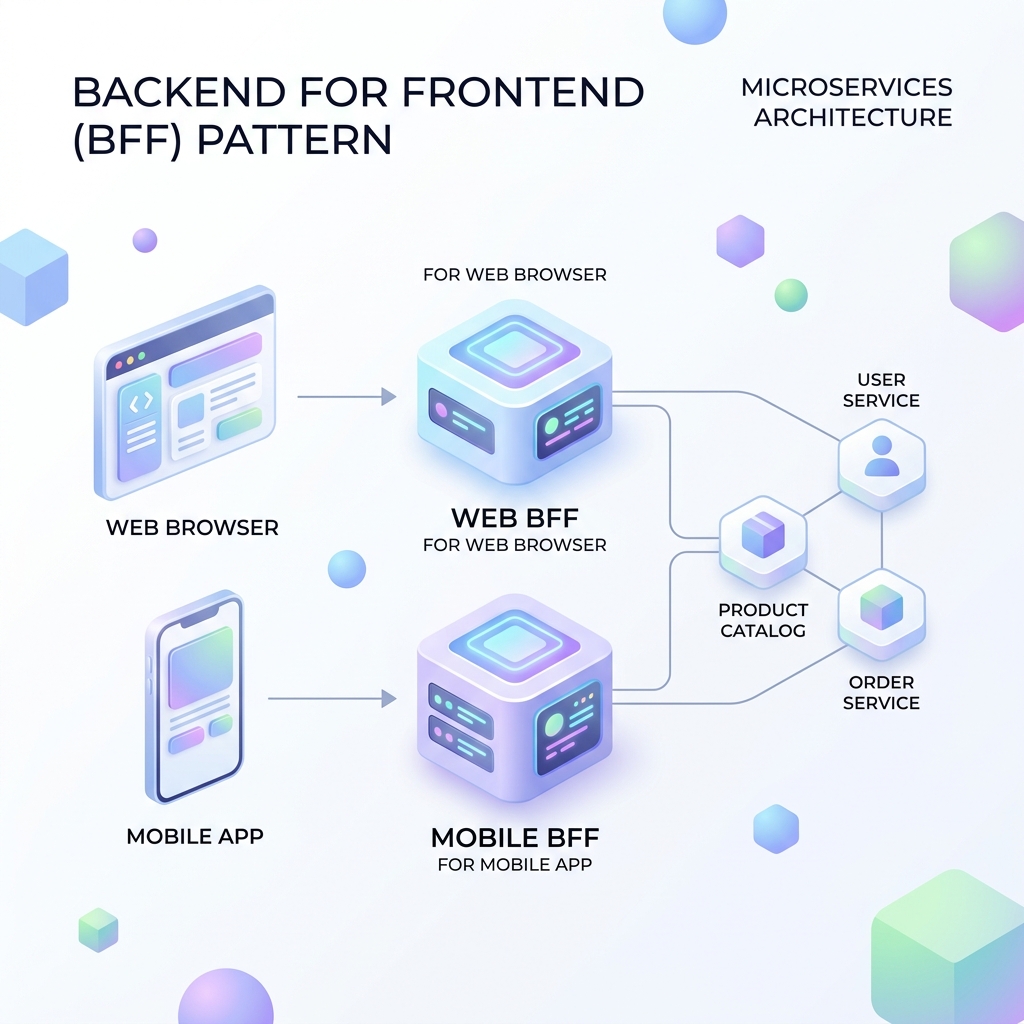
In a microservices architecture, our systems are broken down into dozens of small, focused services—like a User Service, an Order Service, and a Product Service.
But when it comes to displaying this information to your users, different devices have very different needs. A web browser on a high-speed desktop computer wants a rich dashboard full of tables, sidebars, and graphs. A mobile app on a slow cellular network wants a simple, lightweight layout to save bandwidth and battery. A smartwatch app might only need a single line of text.
If all these frontends query the exact same backend API, someone has to compromise. Either the mobile app is forced to download massive amounts of useless data, or the web app is forced to make dozens of separate network requests to fetch everything it needs.
This is the exact problem solved by the Backend for Frontend (BFF) Pattern. In this guide, we will explain this pattern in simple words, look at a real-world analogy, compare it to a standard API Gateway, and walk through a practical code implementation.
The Real-World Analogy: The Restaurant Menu
Imagine a restaurant that serves three very different types of diners:
- A food critic who wants a full 5-course tasting menu with detailed ingredient lists.
- A busy commuter who wants a quick, pre-packaged snack to eat on the train.
- A child who wants a simple kid’s meal with small portions and no spicy ingredients.
If the restaurant only had one single menu that listed all three options in full detail, it would be overwhelming. The commuter would waste time reading through 5-course recipes, and the child’s parents would struggle to find simple food options.
Instead, the restaurant prints three custom menus: a Tasting Menu, a Express To-Go Menu, and a Kids’ Menu.
Each menu draws from the same kitchen (the microservices), but formats and sizes the choices specifically for that customer (the client).
In this scenario:
- The kitchen represents your microservices (User, Catalog, Payment).
- The custom menus are your BFFs (Web BFF, Mobile BFF, Watch BFF).
- The diners are your frontends (Desktop Browser, Mobile App, Smartwatch).
The Problem: The “One-Size-Fits-All” API
When microservices first became popular, many teams built a single, shared API Gateway to handle all frontend clients:
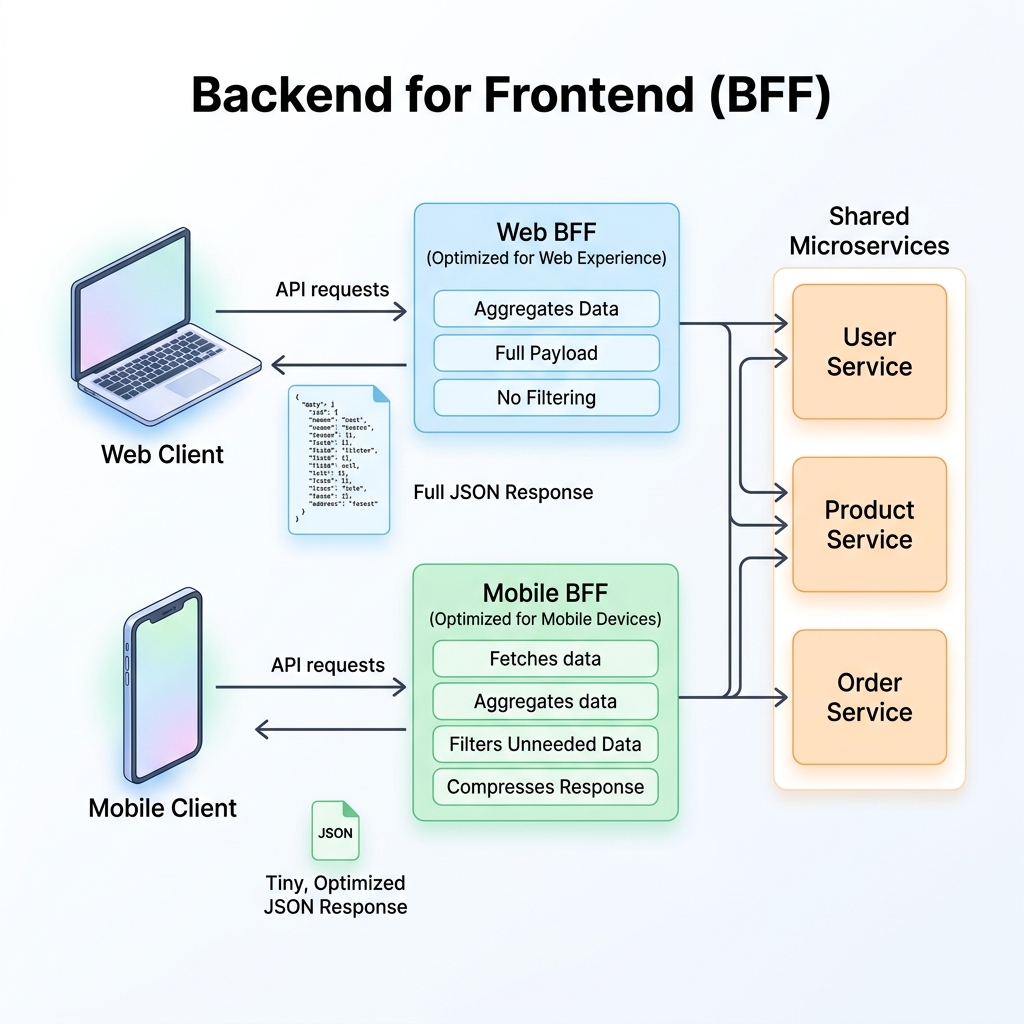
While a single entry point is great, a shared API introduces several scaling bottlenecks:
- Payload Bloat for Mobile: The desktop web app needs the user’s order history, billing address, profile picture, and loyalty points. The mobile app only needs to show “Last Order: Shipped”. With a shared API, the mobile app downloads the entire profile payload, wasting precious data and slowing down load times.
- API Bottlenecks: A single team becomes the bottleneck for the shared gateway. If the iOS team wants to change a small layout field, they must wait for the shared gateway team to deploy a new version, slowing down development cycles.
- Different Security Needs: A web browser might require cookie-based sessions to prevent Cross-Site Scripting (XSS), whereas a mobile app prefers token-based OAuth headers. Handling both in a single server creates complex, messy code.
The Solution: The BFF Pattern
Instead of creating one giant gateway for all devices, the BFF Pattern advocates for building one dedicated backend server for each frontend application.
You will have:
- Web BFF: Handles requests from the desktop browser. It aggregates full profiles, product catalogs, and detailed checkout information.
- Mobile BFF: Handles requests from iOS and Android apps. It aggregates data, filters out unnecessary fields, and compresses the final response to ensure fast performance.
API Gateway vs. BFF: What is the Difference?
It is common to confuse these two patterns because they both sit between the client and the microservices. Here is the distinction:
| Feature | General API Gateway | Backend for Frontend (BFF) |
|---|---|---|
| Number of Gateways | Typically one for the entire system. | Multiple (one for each type of client device). |
| Responsibility | High-level routing, rate limiting, and global security. | Aggregating data and tailoring payloads for a specific frontend. |
| Ownership | Managed by a dedicated backend/platform infrastructure team. | Managed by the frontend team that builds the corresponding app. |
| Customization | Low. Changes affect all clients. | High. Changes only affect one client application. |
A Practical Implementation (Node.js/Express)
To understand how this works in practice, let’s write a simple Node.js example.
Imagine we have two microservices running internally:
- User Service (returns basic user profile information)
- Order Service (returns a list of orders with full detail)
We want to build a Web BFF and a Mobile BFF to serve our desktop site and mobile app differently.
1. The Shared Microservices Mock
First, here is the mock data for our two underlying microservices:
// Internal User Service Response
const userProfile = {
    id: 42,
    username: "dev_coder",
    email: "coder@ghaznix.com",
    avatarUrl: "https://ghaznix.com/avatars/42.png",
    preferences: { theme: "light", newsletter: true }
};

// Internal Order Service Response
const orderHistory = [
    { id: "ORD-99", date: "2026-06-25", items: ["Laptop", "Mouse"], status: "Shipped", tax: 15.00, total: 1215.00 },
    { id: "ORD-88", date: "2026-05-12", items: ["Keyboard"], status: "Delivered", tax: 5.00, total: 105.00 }
];
2. The Web BFF (Returns Complete Detailed Payload)
The Web BFF aggregates all the fields because the desktop screen has plenty of space to show them:
const express = require('express');
const webBff = express();

webBff.get('/dashboard', (req, res) => {
    // Web needs everything: profile + full order details + settings
    const responsePayload = {
        user: {
            username: userProfile.username,
            email: userProfile.email,
            avatar: userProfile.avatarUrl,
            theme: userProfile.preferences.theme
        },
        orders: orderHistory // Send all order details, taxes, and items
    };

    res.json(responsePayload);
});

webBff.listen(3001, () => console.log('Web BFF running on port 3001'));
3. The Mobile BFF (Returns Minimized, Aggregated Payload)
The Mobile BFF filters out unneeded fields (like email, settings, and taxes) and aggregates the order items to save bandwidth:
const express = require('express');
const mobileBff = express();

mobileBff.get('/dashboard', (req, res) => {
    // Mobile only wants: username, avatar, and summary of the latest order
    const latestOrder = orderHistory[0];

    const responsePayload = {
        user: {
            username: userProfile.username,
            avatar: userProfile.avatarUrl
        },
        latestOrderStatus: {
            orderId: latestOrder.id,
            status: latestOrder.status,
            date: latestOrder.date,
            itemCount: latestOrder.items.length // Send count instead of array list
        }
    };

    res.json(responsePayload);
});

mobileBff.listen(3002, () => console.log('Mobile BFF running on port 3002'));
Payload Size Comparison
- Web BFF Response Size: Contains nested configuration, preferences, full order list, taxes, items, etc. (Approx. 400 bytes).
- Mobile BFF Response Size: Contains only 6 key-value pairs representing the bare essentials. (Approx. 120 bytes—70% reduction in network size!).
Pros and Cons of the BFF Pattern
While highly effective, the BFF pattern has trade-offs:
| Advantage (Pro) | Disadvantage (Con) |
|---|---|
| Optimized Client Performance: Clients only load the exact data they need, reducing battery consumption and memory usage. | Code Duplication: You might end up writing similar data-fetching logic in multiple BFF codebases. |
| Faster Release Cycles: The mobile frontend team can update their BFF server without needing to coordinate with web developers. | Increased Server Count: Instead of managing one API gateway, you now have to deploy and manage several BFF services. |
| Simplified Frontend Code: The client does not need to handle complex sorting, filtering, or merging logic; it just displays the JSON it receives. | Security Management: SSL/TLS certifications, rate limit rules, and firewalls must be managed across multiple gateways. |
Conclusion
The Backend for Frontend (BFF) Pattern is a powerful architecture for systems that serve multiple client types, such as web, mobile, and IoT devices. By creating tailored gateways for each specific frontend, you decouple client development, minimize payload size, and deliver a faster, more responsive user experience.
If your system only has a single web application, a shared API Gateway is sufficient. But the moment you start building mobile apps or specialized device experiences alongside your web application, implementing a BFF is the best way to keep your frontend and backend architectures clean, optimized, and independent.
Explore more software development and backend engineering insights on the Ghaznix Blog →
Empower Your Digital Presence & Workflows
Explore top-tier tools built by Ghaznix to streamline your links, surveys, and brand growth.